
OEM Privacy Filter Projects
Custom Privacy Filter Packaging: Choose the Pack Before the Artwork

Choose privacy filter packaging for IT deployment, employee kits or resale, then plan component protection, product identification and artwork.
Choose privacy filter packaging around who opens it and what they need to do next. An IT team fitting a fleet needs quick identification and organized components. An employee needs a complete, easy-to-follow kit. A resale customer needs a clearly identified individual product. Decide that handover first, then develop the artwork around the selected pack.
ScreenWord offers custom packaging and private-label options. The formats below are choices to discuss for your order, not a list of standard included packs.
Choose the packaging format for the recipient
Bulk delivery to an IT installation team
For centralized installation, consider grouped packs that keep each filter protected while making the matching attachment sets easy to count and retrieve. Tell the supplier whether one person unpacks the delivery or several technicians collect kits from a staging area.
Grouping can reduce repeated retail presentation, but it moves more sorting work to the installation team. If different attachments look similar, loose shared supplies can create confusion. Keep the association between a filter and its kit visible even when the outer package contains several units.
Use the bulk privacy filter purchasing service to discuss quantities and packing for a deployment. Include the team’s unpacking routine, not just the total number of filters.
Individual packs for resale or employee distribution
An employee kit should remain complete when separated from the main shipment. The recipient needs to identify the intended filter, find its attachment parts and reach the instructions without asking the central team to reconstruct the set.
A resale pack has a different handover. It needs enough product identification for a stockroom or customer to select the right item without opening every box. Consider the selling channel: a product displayed individually may need different presentation from one sold online and placed inside a separate shipping package.
| Recipient and use | Packaging choice to discuss | Main benefit | Trade-off to work through |
|---|---|---|---|
| IT team installing centrally | Grouped protected filters with clearly associated attachment kits | Supports organized picking and counting at an installation station | The team takes on sorting; mixed versions need clear identification |
| Employees receiving their own kits | One complete individual set with an accessible instruction entry | Keeps the filter and required parts together after distribution | More individual packaging to assemble, distribute and dispose of |
| Customers buying single units | An individually identified resale pack with a defined contents list | Supports product selection, stock handling and a clear unboxing sequence | Presentation, pack size and print changes affect the packing proposal; shipping protection is a separate decision |
Photodon’s business solutions page also distinguishes bulk, individual and private-label packaging as services. Those are examples of industry options, not specifications for a ScreenWord pack.
Keep the filter and attachment kit together
Separate hard components from the optical surface
Describe the separation you need before choosing a tray, sleeve or box insert. The filter needs its own protected space; any hard attachment components should be retained separately so they are not loose against the optical surface. Select the actual materials and retention method with the packaging supplier using the real contents.
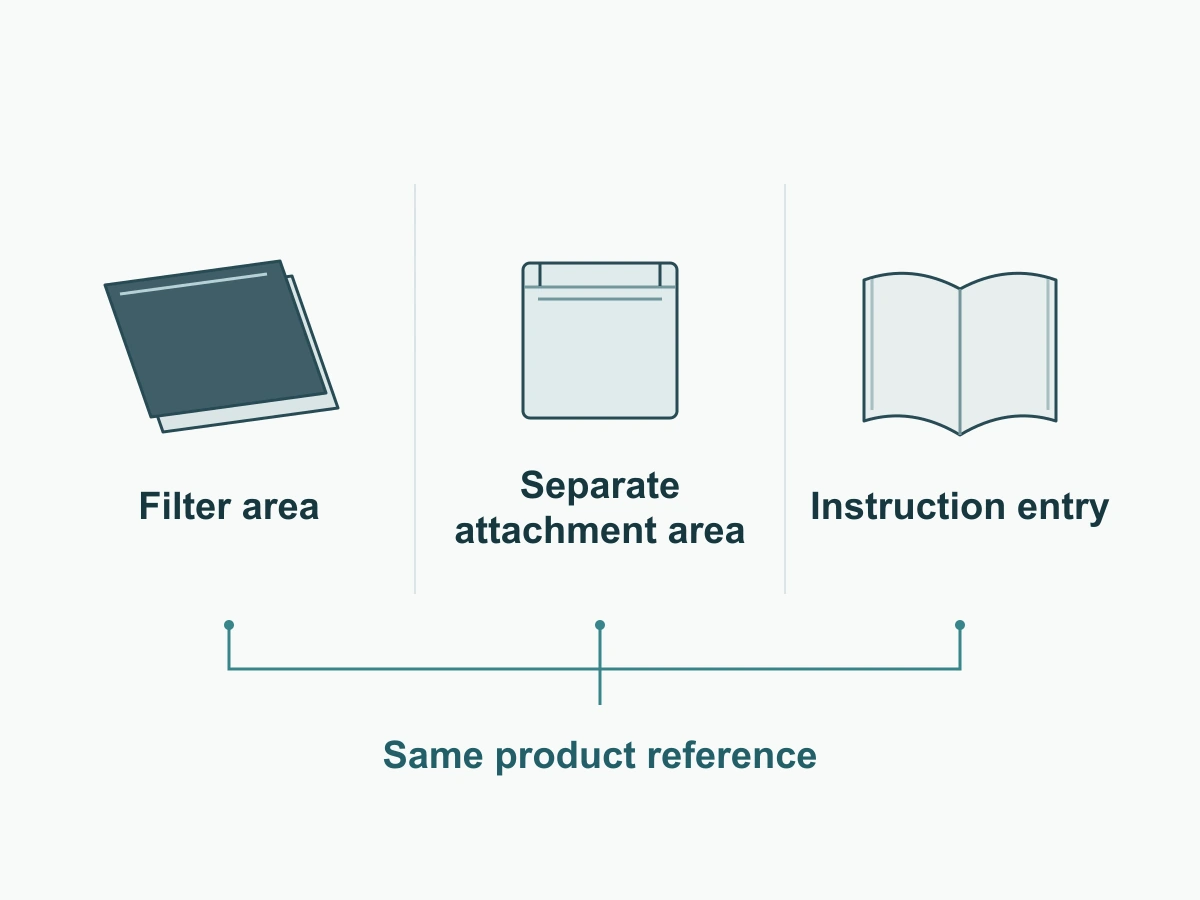
Use this opening layout as a functional brief, not a measured package drawing:
- Filter area: holds the filter in its selected protective arrangement and allows removal without forcing it past loose accessories.
- Attachment area: holds the specified kit separately from the filter surface while keeping it associated with that filter.
- Instruction entry: makes the correct printed reference or digital route visible when the pack opens, before installation begins.
For a grouped deployment pack, the same relationship can be maintained through individually identified sets within the outer pack. Do not assume all filters use the same kit or that an accessory visible in a product image is included in the quoted set.
Make the correct installation option recognizable at opening
Use a plain attachment name and the agreed product reference where the recipient first looks. Keep that reference consistent on the contents list, kit identification and instructions. Color may help distinguish versions, but a written name remains useful when packs are separated or viewed under different lighting.
Have someone unfamiliar with the pack identify the filter and matching parts without coaching. If they need to open several accessory packets to work out what belongs together, revise the identification or arrangement before concentrating on graphic finishes.
Decide what belongs on the pack
Product identity, contents and installation reference
Include information that helps the recipient select and use the supplied item. The packaging brief should identify the following fields without turning the front panel into an order spreadsheet.
| Field | What to supply |
|---|---|
| Product identity | Agreed product name, filter reference and only the fit description confirmed for that item |
| Contents | The actual filter and attachment items included in this pack, with their quantities |
| Installation option | The attachment name that matches the enclosed kit |
| Instruction reference | Printed leaflet reference, or an existing URL and revision responsibility for the selected product |
| Pack identity | Buyer item reference and any required barcode or batch field, supplied by the responsible party |
| Language and support | Required language and the approved support route for the recipient |
If using a QR code, identify who owns its destination and test the actual link before printing. Provide a readable alternative route where useful, especially if employees may not have a phone or internet access at the installation station. Do not print a link to instructions that do not yet exist.
Brand artwork and variable fields serve different purposes
Brand artwork sets the consistent presentation: logo, approved colors and shared text. Variable fields identify what is inside this particular version, such as the product reference, attachment option or buyer-supplied barcode. Keep those fields separate in the artwork brief so a shared design does not accidentally label every configuration as the same item.
Assign ownership before requesting a proof. The buyer supplies the approved brand assets and item data; the supplier confirms the proposed contents; the printer specifies the production layout and file requirements. Name who checks the combined proof.
The mixed-size order guide covers linking packing and label revisions to an order. Here, the immediate task is to make one pack understandable when opened.
Prepare one pack mock-up before production
Check opening, component fit and instruction access
Request a physical mock-up with the intended filter and attachment contents before committing to the print run. A plain mock-up can answer handling questions while the artwork is still being developed.
Check it in the order the recipient will use it:
- Identify the product from the outside without opening neighboring packs.
- Open it using the intended method and reach the instructions.
- Remove the filter without catching it on loose parts or forcing it out.
- Find and count the attachment items against the contents list.
- Check that hard components remain separated from the optical surface in the proposed arrangement.
- Follow the instruction entry to the correct product and language.
- Place the complete unit into the proposed outer packing arrangement to assess storage and handling space.
Record the change needed if a step is awkward. A mock-up supports fit and unboxing decisions; it does not establish resistance to transport damage. If shipment performance matters, agree the relevant evaluation separately.
Confirm the actual dieline and print requirements last
Once the pack and contents work together, obtain the final dieline for that exact format and size. A dieline is the production template showing where the pack is cut and folded. Place the final artwork on the supplied version rather than resizing a template from another pack.
Confirm the printer’s bleed, safe area, color and file requirements. Bleed extends edge artwork beyond the cut; the safe area keeps essential text away from trimming and folding. Packhelp’s artwork guidance illustrates these separate requirements, but its measurements are not universal settings or ScreenWord specifications.
Review the final proof for product identity, contents, variable fields and instruction access. If the structure changes, update the dieline before releasing the artwork.
For supply planning, see ScreenWord’s manufacturing capabilities. Then Request a Quote with the filter reference, recipient type, quantity, proposed pack format, contents and branding needs. Paste the summary into the form and send artwork or reference files separately through the website’s provided contact options.