
Laptop Privacy Screens
How to Plan a Mixed-Size Laptop Privacy Screen Order
Plan a mixed-size laptop privacy screen order with clear group IDs, quote checks, sample records, packaging instructions and delivery requirements.

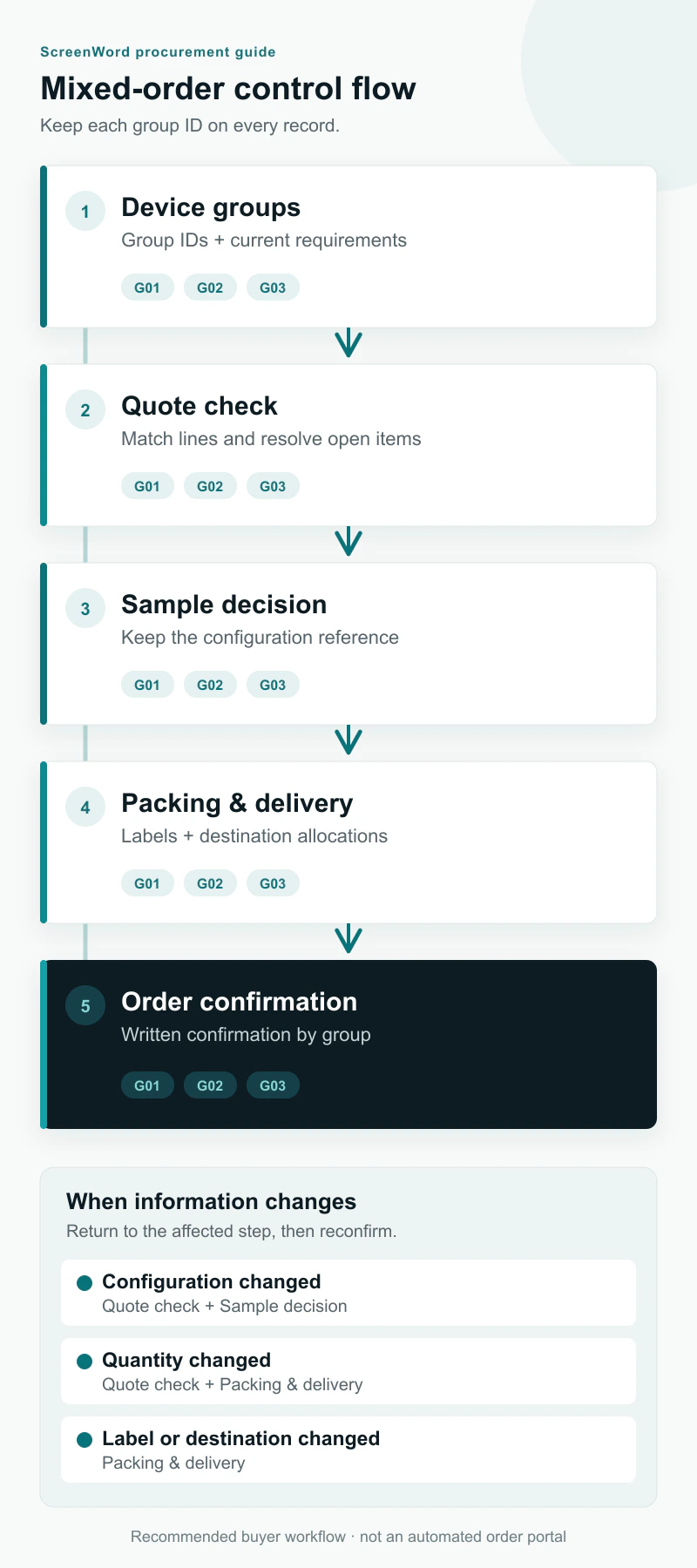
A mixed-size laptop privacy screen order is ready to confirm when each requested configuration has a matching quotation line, a recorded sample decision and clear packing and delivery instructions. The overall quantity is only one part of that record.
For corporate buyers, distributors and accessory brands, the practical task is to keep the same group references from the first requirements list through the final order. That makes it easier to spot a missing configuration, reconcile a quantity change and tell a receiving team which packs belong to which devices.
Give each configuration a stable group ID
Start with the laptop privacy screen families, then choose the relevant series: Universal Laptop installation options, MacBook privacy screen options or Microsoft Surface privacy screen options. Select the installation path within that series and record its product reference in the requirements list.
Assign a group ID such as G01 to each distinct device and configuration. Keep the exact model, fit-record reference, attachment method and requested function version together. Two otherwise identical devices need separate groups when their requested attachment or function differs. A shared diagonal label is insufficient for merging rows.
Use the supplier’s exact function name or code once agreed. If a buyer asks for a particular optical function but the version has not been selected, write the request in plain language and leave the final code open for review. A product title alone does not describe the full configuration.
Keep the group ID stable across documents. A supplier may use a different quotation line number; add a cross-reference rather than replacing your group ID. Record the requirements revision, quotation revision and sample reference alongside it.
For supporting details, use how to measure a screen for a privacy filter for measurement steps, the laptop privacy-screen attachment comparison for installation choices, and the privacy filter measurement worksheet for the device and fit fields. Carry those records into the order by reference.
Example: a three-group order before quotation
Illustrative order only. The following quantities, group IDs, fit references and site names are invented to demonstrate the workflow. They are not a customer case, an actual quotation or confirmed device specifications. Exact models and dimensions remain open; no prices are supplied. PRV and PBL are catalog function codes used here as requests, with the final version to be recorded in the written configuration.
| Group ID | Device series | Requested installation and function | Production quantity | Fit record to complete | Requested delivery allocation |
|---|---|---|---|---|---|
| G01 | Universal Laptop | Magnetic; PRV requested | 120 pieces | FIT-G01: exact model, visible dimensions, ratio and edge evidence | 80 to Site A in wave 1; 40 to Site B in wave 2 |
| G02 | MacBook | Nano direct-attach; PBL requested | 60 pieces | FIT-G02: exact model, visible dimensions, ratio and camera/edge evidence | 60 to Site A in wave 1 |
| G03 | Microsoft Surface | Slide-tab; privacy function requested, exact version pending review | 40 pieces | FIT-G03: exact model, visible dimensions, ratio and attachment-edge evidence | 40 to Site B in wave 2 |
The production total is 220 pieces. Wave 1 contains 140 pieces for Site A; wave 2 contains 80 pieces for Site B. Sample quantities are recorded separately and are not included in those totals.
The example illustrates three review tasks: finish each fit record, obtain a quotation line for every group, and agree the function version for G03. A blank value means an open item, not permission to substitute another group’s specification. Ask the supplier to return the group IDs with the quote so the buyer can reconcile it directly.
Match the quotation to the requirements, line by line
Place the latest requirements list and quotation side by side. Start with the group count, then compare quantities and configuration references. A correct grand total can still conceal a wrong split between devices.
If the quote combines groups, request a breakdown that preserves each group’s quantity and specifications. Where one group appears on several quotation lines, add those quantities before checking the group total. Identify sample charges, packaging items and freight separately so they are not mistaken for production quantities or included services.
Use this table as a working reconciliation sheet. Replace each open entry with the quotation reference, finding, owner and date; mark an item agreed only when the two records match.
| Check | Requirement or source record | Quotation or order entry to match | Result / action / owner / date |
|---|---|---|---|
| G01 production line | Example: G01, 120 pieces, magnetic, PRV request, FIT-G01 | Quote line ___; quantity ___; exact product, function and specification revision ___ | ___ |
| G02 production line | Example: G02, 60 pieces, nano direct-attach, PBL request, FIT-G02 | Quote line ___; quantity ___; exact product, function and specification revision ___ | ___ |
| G03 production line | Example: G03, 40 pieces, slide-tab, function version open, FIT-G03 | Quote line ___; quantity ___; agreed function code and specification revision ___ | ___ |
| Complete group coverage | Latest requirements revision; one entry for every group | No missing group; additional or substitute items explained | ___ |
| Dimensions and configuration | Group-specific fit record, final filter dimensions, attachment and function version | Exact specification or drawing reference and revision for each line | ___ |
| Production and sample quantities | Production totals by group; sample quantities listed separately | Unit of sale identified; samples distinguished from production supply | ___ |
| Price basis and arithmetic | Requested quantities and agreed packing units | Currency, unit price, line quantity, line total and overall total checked | ___ |
| Samples and other charges | Sample request, packaging artwork and shipping requirements | Sample, tooling/artwork, packing and freight charges or inclusions explicitly recorded where applicable | ___ |
| Packaging and labels | Pack style, quantity per pack/carton, label text and artwork revision | Matching packing and label instructions by group | ___ |
| Destinations and delivery waves | Group quantities allocated to each destination and wave | Dispatch plan, delivery requirements, shipping terms and costs recorded | ___ |
| Payment and quote validity | Written commercial terms | Payment method, payment schedule and quotation validity recorded | ___ |
If a cell differs, describe the discrepancy precisely: “G02 quantity differs from requirements revision 2” is more useful than “please check the quote.” Return one consolidated list of open items and ask for a revised quotation or an explicit written response to each item.
Keep the sample result attached to the configuration
Choose samples by the questions that need resolving. A new model, changed attachment, requested function version or revised coverage may need its own sample review. Identify the group and configuration revision before requesting the sample.
Give each sample a reference, for example SAMPLE-G01-R1, and record the device used for review. Note the result for coverage, camera or sensor clearance, attachment placement and the agreed handling routine. For function requirements, record the requested version and the evaluation method agreed for the project; use supplier evidence where a result needs technical substantiation.
Write observations that someone else can act on: the affected edge or opening, the relevant photo, the requested adjustment and who will confirm it. Use statuses such as Awaiting review, Change requested or Accepted for the named configuration. Keep the reviewer and date with the result.
Use the following checklist for each group. Enter the evidence reference and current status rather than ticking every row before the supporting record exists.
| Stage / check | Record to complete for this group | Status / reviewer / date |
|---|---|---|
| Sample scope | Group ID ___; requested sample quantity ___; sample ID ___; configuration revision ___ | ___ |
| Device reviewed | Exact model ___; fit record ___; front/edge photo references ___ | ___ |
| Fit and attachment result | Coverage, camera/sensor clearance and attachment observations ___; evidence ___ | ___ |
| Function version | Exact version ___; agreed evaluation or supporting evidence ___; result ___ | ___ |
| Sample decision | Accepted / change requested / awaiting review; reason and outstanding action ___ | ___ |
| Revised sample, if needed | New sample ID ___; superseded sample ___; changes and recheck result ___ | ___ |
| Configuration for the order | Agreed product and final dimensions ___; attachment ___; function ___; specification revision ___ | ___ |
| Quote reconciliation | Quotation revision and line ___; group quantity ___; unresolved differences ___ | ___ |
| Packaging and destination | Label/artwork revision ___; packing instruction ___; destination and wave allocation ___ | ___ |
| Written order confirmation | Order reference/revision ___; authorized buyer confirmation ___; supplier acknowledgement ___ | ___ |
A sample decision belongs to the configuration reviewed. When the order uses a later specification, record how the sample decision was carried forward or what was checked again. Keep the accepted sample reference on the final order record so production and receiving teams can find it.
Confirm packing, labels and split deliveries by group
For each group, agree individual packaging, pack and carton quantities, label content and any brand artwork. Keep a plain group ID visible on the packing record even when the buyer uses its own retail SKU. If the same configuration needs different customer labels, use separate packing sublines tied to the parent group.
For reseller or brand orders, record the approved artwork filename and revision, the required label language and any buyer-provided barcode reference. Confirm label content as supplied; avoid having a supplier infer which artwork is current from several message attachments.
Give each delivery allocation a full destination, consignee, receiving contact and any receiving-window requirements. Distinguish requested arrival dates from proposed dispatch dates, and ask the supplier to confirm the relevant shipping terms and schedule. A production estimate does not include every transport or receiving step.
For the example, G01 needs separate packing allocations for its 80-piece and 40-piece deliveries. Each packing list should identify group ID, order reference, configuration reference, pieces per carton and destination/wave. Check that carton quantities reconcile with the group allocation and that allocations sum to 220 production pieces overall.
State whether partial dispatch is acceptable and which groups may ship together. If one group’s sample is still under review, agree whether the other groups should wait or proceed as a separate confirmed release. Record any change in freight cost or schedule before confirming that split.
Reconfirm the affected records when an order changes
Keep one dated revision of the requirements list as the current version. Each change should identify the group, old value, new value, reason and affected quotation or order reference. Keep earlier revisions available so a sample label or prior quote remains traceable.
- Model, dimensions or edge condition changes: revisit the fit record, final filter specification and sample decision. Split into a new group when the original configuration is still required alongside the new one.
- Attachment or function version changes: identify the replacement configuration, review the sample requirement, update the quotation and check labels, packaging and timing. Keep alternatives on separate subgroups while both are under consideration.
- Quantity changes: keep the configuration reference, but recheck line totals, price basis, packing quantities, availability and delivery allocations. A stable overall total does not remove this step when quantities move between groups.
- Packaging, label or destination changes: revise the artwork or packing reference, carton allocation, shipping terms, costs and schedule. Confirm whether the change affects goods already packed or dispatched.
For example, moving 20 pieces from G01 to G02 leaves the order at 220 pieces but changes both quotation lines and their packing allocations. If the additional G02 pieces are required at Site B, update the destination split as well. Return the revised group list and obtain a matching written quotation or order confirmation before proceeding with the changed scope.
Frequently asked questions
Can one mixed order include different function versions?
List each version as a separate configuration within the relevant device group. Ask the supplier to identify the offered function code and product reference on the quote, then carry that reference into the sample and order records.
Does every group need a sample?
Record a sample decision for every group. Where a relevant configuration has already been reviewed, identify the prior sample or evidence and agree whether it covers the current request. Where the device or configuration changes, identify what needs another review.
What if the quotation is ready but some fit information is missing?
Flag the affected group and the missing information. Use the quote for planning, then complete the specification and sample decision before confirming that group’s production scope. Other groups can follow an agreed separate release if required.
How do I send the full order sheet?
Paste a concise group summary into the inquiry form’s device-list or message field. Share the full spreadsheet, drawings, sample photos or label files through the WhatsApp, Telegram or WeChat contact options provided on the website. Include the same group IDs and revision in both the form summary and the files. The form does not transmit attachments.
Send a summary that can be matched to a written quote
Include the group IDs, device series/model references, requested installation and function, quantities, fit-record status, sample needs, packaging, destinations and delivery waves. Identify open decisions and the revision you want quoted.
For purchasing support, use bulk privacy screen filter orders. To start the written review, request a mixed-size quote and paste the summary into the form. Send any supporting files through the website’s existing contact options using the same reference.