
B2B Privacy Filter Procurement
How to List Privacy Filter Sizes and Compatibility for Resale

Make reseller privacy filter listings easier to buy from with clear device, attachment, size, image and compatibility information.
List a privacy filter by the device it is intended for, its attachment method and its material. Separate the device’s marketed screen size from the filter’s actual width and height, show the selected version in the pictures, and state whether the exact fit is established or needs a device-specific inquiry. A buyer should be able to identify the item without guessing what a size label or photograph means.
The most useful listing answers two questions together: “Is this the kind of product I want?” and “What do I need to select the right version?”
Put the purchase-critical information first
Device family, attachment method and material
Start with a recognizable product name, then give the details that distinguish it from the next option. “Magnetic laptop privacy screen” tells a buyer more than “Premium privacy protector.” Add PET as the material where that is the material of the selected product, and keep the device family visible near the selection controls.
Google’s product-title guidance recommends identifying the actual product, distinguishing variants and putting important details first. For a privacy filter listing, that means making the attachment and device context easy to find—not packing every related search term into the name.
Use the privacy filters by device and installation to separate the relevant product routes. A magnetic laptop filter, a Surface slide-tab filter and a hanging acrylic monitor screen should not look like interchangeable choices under an unexplained “style” menu.
Keep marketed screen size separate from the actual filter dimensions
Label the screen-size field as the device’s marketed diagonal, with its unit. Label the product-size field as the finished filter width × height in millimeters. Give the aspect ratio separately when it helps distinguish options.
Those fields describe different things. A diagonal alone does not identify a screen’s width and height, and the visible display dimensions are not automatically the finished filter dimensions. A filter’s intended coverage, attachment and openings also affect its outline.
If the exact filter dimensions for an inquiry option have not been supplied, do not turn a diagonal into a guessed measurement. Tell the buyer to request the dimensions for their selected configuration. For a ready-to-order variant, obtain that information before presenting it as an exact-fit purchase.
Show the product the buyer will receive
One image set for one installation option
Keep the main photograph, attachment close-up and included-item view tied to the selected option. If the buyer changes from magnetic to another attachment, the images and description should change with it. Otherwise, an accurate title can still lead to the wrong expectation.
Show enough of the screen edge to make the attachment understandable. A photograph of a filter lying beside a laptop can establish the item being discussed; a relevant installed view helps explain how it is used. Neither should silently promise fit on every device shown elsewhere in the catalog.
Separate alternate products into their own choices. Do not illustrate a magnetic product with a clip installation simply because the display looks similar.
List included components and avoid mixing PET with hanging acrylic
Distinguish the filter itself, parts of its attachment structure and separately supplied accessories. List a cloth, storage folder or spare fitting only when it is included in the offered package. A styling prop or an accessory shown in a use photograph is not an included-item list.
For ScreenWord’s magnetic laptop route, a protective folder can explain storage after removal, but its inclusion belongs in the selected package description. Avoid “complete kit” when the contents have not been named.
Keep material information equally specific. ScreenWord’s hanging acrylic monitor route is separate from its PET routes. Do not copy a PET specification block into an acrylic listing or reuse the same attachment illustration for both.
Write compatibility without overpromising
Confirmed configuration wording versus fit-review wording
When fit has been established, name the exact device and filter configuration covered by that finding. Keep the attachment and any relevant coverage option beside the compatibility description. A statement about one configuration should not expand into a claim about every model in the family.
For an inquiry option, use direct wording: “Share your device model and screen information so we can identify a suitable magnetic configuration.” This tells the buyer what to do next without presenting an unresolved match as an available exact-fit variant.
If a buyer needs a particular optical function or material property, include the specification for that offered version rather than a catalog-wide badge. ScreenWord’s quality and capabilities information provides a route for those specification questions.
A device brand identifies a target device, not the filter manufacturer
Keep the accessory brand distinct from the device it is intended to fit. A laptop manufacturer’s name in a compatibility description does not make the filter that manufacturer’s product or establish an endorsement.
Likewise, “universal” should describe a size-based selection route, not a promise that one item fits every laptop. Give buyers a clear way to identify the appropriate configuration instead of relying on that word to settle fit.
Work through one catalog card example
A magnetic laptop filter with clear size information
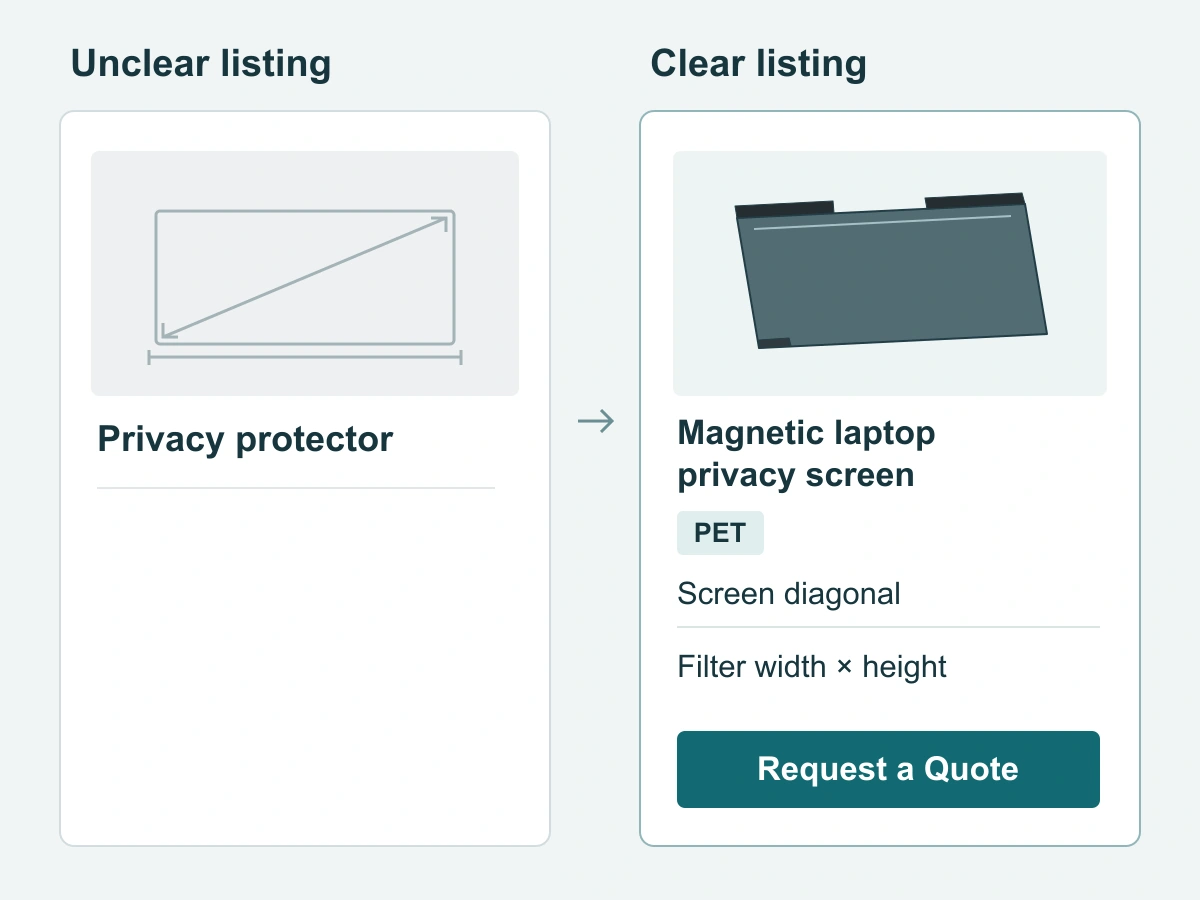
The following is an example of improving an inquiry-stage product card, using the ScreenWord magnetic laptop privacy screen route. It is not a model-specific offer. No exact device or filter dimensions are implied.
| Card detail | Unclear wording or presentation | Clearer buyer-facing treatment |
|---|---|---|
| Name | “Universal privacy protector” | “ScreenWord Magnetic Laptop Privacy Screen” |
| Attachment | “Easy installation” with no method named | “Magnetic attachment; removable for shared viewing” |
| Material | “Premium film” | “PET privacy filter” |
| Size meaning | A screen diagonal presented as the product’s complete size | “Device screen size is a diagonal reference. Ask for the filter width and height in millimeters for your selected configuration.” |
| Components | “All accessories included” beside a styled photograph | “Confirm package contents with your quote, including any requested storage folder.” |
| Images | Magnetic, adhesive and clip pictures mixed together | Show the magnetic filter and its corresponding attachment; identify storage accessories separately |
| Fit | “Fits all laptops” | “Share your device model and screen information to identify the appropriate magnetic configuration.” |
| Next action | “Buy now” before the version is identified | “Request a Quote” with the device, desired option and quantity |
The clear card lets the buyer understand the product immediately while keeping the unresolved size question actionable. Once an exact version and package are agreed, replace the inquiry wording with those actual dimensions, contents and supported configuration—not with a broader promise.
Explain how a buyer selects an option and asks for fit review
Guide the buyer from device family to attachment, then to the specific product. Keep their selected product name in the inquiry summary so the conversation starts with the same item they were viewing.
For resale quantities, use bulk privacy filter purchasing. When a request contains several established configurations, the mixed-size order guide explains how to carry them into a written order; there is no need to turn a single product card into an order spreadsheet. To decide which items to carry, see how to choose configurations for a reseller range.
Request a Quote with the product route, device information, required quantity and any package or specification question. Paste the summary into the form. Send supporting files separately through the WhatsApp, Telegram or WeChat options provided on the site.