
B2B Privacy Filter Procurement
Compare Privacy Filter Deployment Costs Beyond the Unit Price

Compare quoted filter costs with installation effort, accessories and packaging. Use a blank deployment budget without invented prices or savings.
Compare privacy filter deployment costs by separating what suppliers charge from the time your team will spend preparing, installing and supporting the filters. Use the same device quantities, delivery scope and planning period for each option. A lower unit price does not settle the budget if the offers include different accessories, packaging or work for your staff.
Start with actual written quotations and your own time estimates. Keep missing costs visible instead of entering zero, and keep hours separate from money until your organization provides a costing rate.
Define the budget scope
Filter purchase versus internal deployment effort
Define the rollout you are comparing: the devices covered, the selected configurations, the number of units, the receiving locations and the period over which support or replacement will be considered. Use the same scope for every option, including whether sample units and spare units are additional to the deployment quantity.
Maintain two views of the investment. The external-cost view includes goods and services you expect to purchase. The internal-effort view includes work your organization will carry out, such as arranging samples, preparing installation instructions, distributing filters and answering user questions.
These views answer different questions. An invoice is a purchasing commitment; staff hours also affect capacity even when they do not create an additional invoice. Do not describe existing salaried time as a new cash payment unless that is how your budget treats it.
For a mixed deployment, use bulk privacy filter purchasing to discuss the supply scope. Keep the device and configuration references already prepared for the project; the budget does not need another full equipment list.
Separate one-time and repeat costs
Samples, tooling, accessories and packing
Separate initial setup from items that recur with each unit or shipment. Sample purchases, sample freight and a quoted setup charge may belong to the initial project. Additional samples or revised artwork may introduce another charge, so “one-time” should describe the agreed scope rather than an assumption that revisions are always free.
Identify which accessories and packaging are included in the filter price. Add a separate cost only for an item outside that quoted scope. A storage accessory visible in a product photo is not enough to establish either inclusion or price.
Ask whether packaging is priced per filter, per pack, per carton or per order. The same approach applies to labeling and delivery charges: use the unit stated in the quotation, not whichever unit makes the arithmetic easiest. For non-standard coverage or private-label requirements, use the custom privacy filter project route to identify what needs a separate quotation.
Installation, support and replacement assumptions
Estimate preparation time separately from repeated work. A team may prepare an instruction once, then unpack, identify and fit each unit. Include local distribution or user handover when your staff will do it.
Use your own trial of the intended configuration to estimate fitting time. Record what the estimate includes, who performed the work and whether it covers a first installation or a familiar repeat task. If different device groups involve different work, keep separate time estimates rather than applying the easiest installation to the whole rollout.
Support and replacement belong to an explicit planning period. Base any expected events on your own records or a clearly labeled planning assumption. Do not invent a filter lifespan, replacement rate or expected helpdesk saving. If installation is outsourced, record the external service charge and only the coordination work that remains internal; avoid charging for the same task twice.
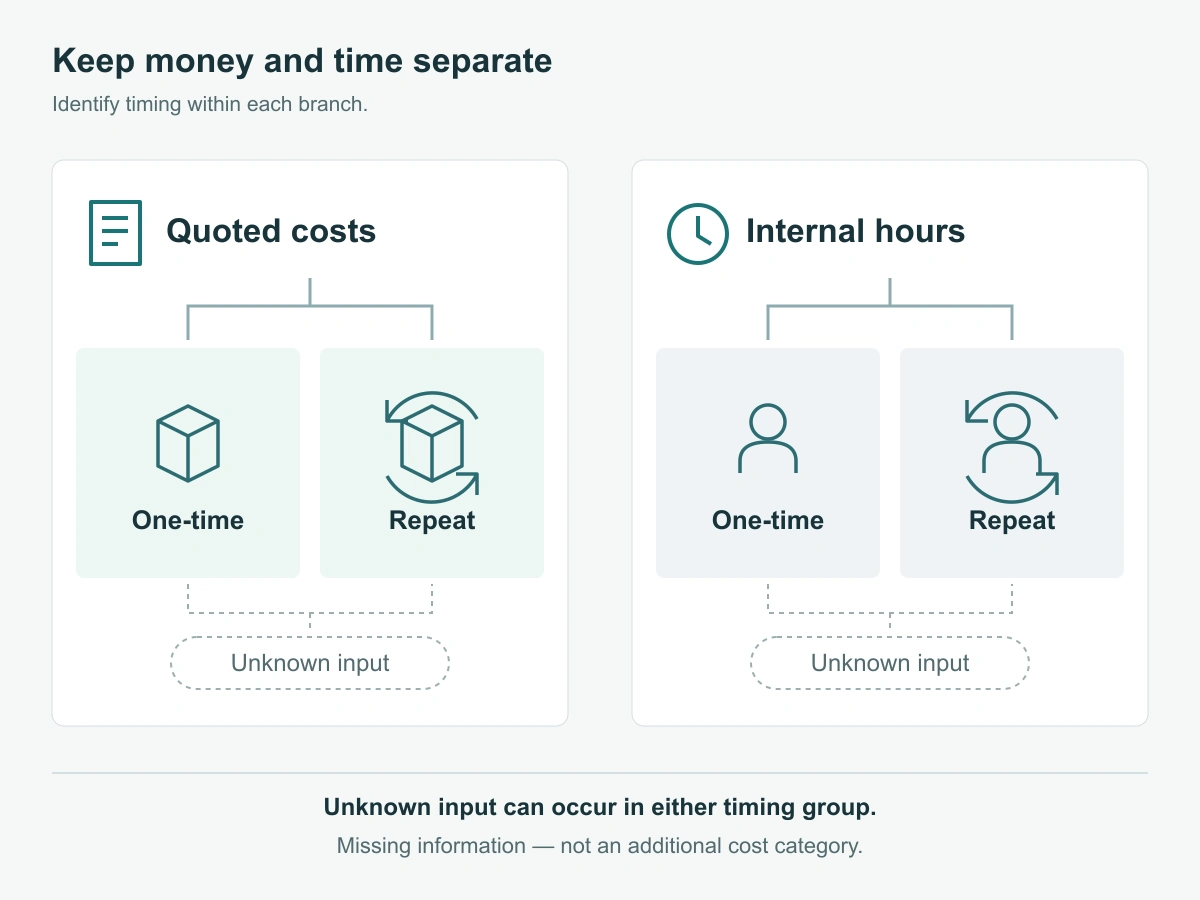
Build a blank comparison worksheet
Quantity times quoted cost; buyer-supplied hours
Use the formula table to build one worksheet for each proposed configuration and offer. It contains no sample amounts or assumed working times. Classify each line as one-time, repeat or unknown for your project. “Unknown” is an open input, not a zero-cost category.
| Budget line | Timing to identify | External quoted cost calculation | Internal estimated effort, in hours | Input needed from your project |
|---|---|---|---|---|
| Production filters | Repeat with purchased units | Sum of quantity × quoted unit cost for each configuration | None on this line; record handling below | Written configuration, quantity, price unit and quotation reference |
| Samples and sample freight | Initial; further rounds separate | Quoted sample charges + sample delivery charges | Buyer-supplied sample review hours | Sample scope and whether any later credit is explicitly offered |
| Tooling, artwork or setup | One-time within quoted scope; revisions separate | Sum of applicable quoted setup charges | Buyer-supplied preparation or artwork coordination hours | What the charge covers and when it would recur |
| Additional accessories and packaging | Per unit, pack, carton or order | Quoted quantity × price for items not already included | Additional local packing hours, if performed internally | Included contents, packing unit and any local work |
| Delivery and other applicable external charges | Per shipment or quoted basis | Sum of quoted charges not already counted | Buyer-supplied receiving or distribution hours | Destination, delivery scope and excluded charges |
| Installation preparation and fitting | Preparation once; fitting per device | Quoted outside installation service, if used | Preparation hours + sum of device quantity × measured or estimated fitting hours | Work split between supplier, contractor and internal team |
| User handover and support | Initial handover; repeat within stated period | Separately purchased support services, if any | Handover hours + expected support events × estimated hours per event | Period and the buyer’s basis for expected events |
| Spares and replacement activity | Initial spares or later purchases; keep separate | Additional units × quoted cost + separate delivery charges | Buyer-estimated replacement and coordination hours | Existing spare allocation and replacement assumption |
Add spare units only once. If they are already included in the production-filter quantity, do not add their purchase cost again under replacement. Likewise, a replacement taken from paid-for stock creates handling work, but not another purchase of that same unit.
Calculate the totals in this order:
- External-cost subtotal: add the applicable quoted amounts, counting each charge once.
- Internal-effort subtotal: add the estimated hours. Where roles differ, retain hours by role.
- Optional internal labor value: multiply each role’s hours by the costing rate supplied by your organization, then add those values.
- Comparable budget total: external-cost subtotal plus internal labor value, only when both use the same currency and period. Otherwise report money and hours side by side.
Use this summary after completing the detailed lines. Blank cells are for your actual figures and open items, not suggested values.
| Offer / configuration reference | External-cost subtotal and currency | Internal hours by role | Internal labor value, if costed | Unknown items and exclusions |
|---|---|---|---|---|
| Option A | ||||
| Option B |
Keep currency and shipping basis explicit
Record the quote currency, validity date, destination and delivery basis beside the subtotal. If offers use different currencies, retain the originals and record the conversion rate, date and source chosen by your organization. Do not quietly convert one offer while leaving another on a different basis.
Check whether transport and any applicable duties, taxes or handling charges are included, separately quoted or still unknown. Ask the relevant supplier, carrier or internal team for the missing basis; do not insert a generic rate. A supplier’s dispatch estimate also does not establish the full time or cost of delivery to each office.
Use uncertainty rather than false precision
Record missing quotations and assumptions
Separate quoted amounts from estimates and unresolved items. If freight is missing, label the subtotal as excluding freight. If support effort is uncertain, show the assumption and the person responsible for refining it.
Where your team can support more than one time estimate, compare the effect of those buyer-supplied estimates while holding the other inputs constant. That shows which uncertainty matters to the decision without inventing a saving percentage or making one precise-looking total stand for an incomplete budget.
Request comparable written scope
Ask each supplier to quote the same configurations, quantities, accessories, packaging and delivery scope. Thomas’s procurement checklist similarly separates defining requirements and budget from comparing quotations and commercial terms. The worksheet above applies that distinction to external filter costs and your own deployment effort.
ScreenWord’s public pricing is indicative; request a written quote for the selected scope. Once you move from budget comparison to order confirmation, the mixed-size laptop order guide explains how to reconcile the actual quotation and order records.
Request a Quote with the configuration references, quantities, sample needs, packaging, destination and timing, plus the cost items you need clarified. Paste a concise summary into the form. Share supporting budget sheets or drawings separately through the WhatsApp, Telegram or WeChat options provided on the site.