
Workplace deployment
Run a Privacy Filter User Pilot Before a Company-Wide Rollout

Plan a privacy filter pilot using real work tasks and representative roles. Record actionable feedback before deciding rollout and exceptions.
Before ordering privacy filters for everyone, ask representative employees to try the proposed setup on work they actually do. Observe reading, collaboration and any supported removal routine, then decide which roles can proceed and which need a change or an exception. A filter fitting one laptop—and one person accepting a sample—does not answer those questions for the whole company.
A useful pilot ends with a task-based decision: what worked, what interrupted the work, and what should happen next. It does not need an invented satisfaction score.
Choose real work to try before rollout
Reading a spreadsheet, reviewing with a colleague and removing a supported filter
Choose participants around differences in work, not simply whoever is available near the purchasing team. Include roles that read detailed information, review a screen with colleagues or switch between individual and shared work. Where laptop and monitor routines differ, keep those setups distinct.
Ask each representative which routine matters most and invite voluntary feedback. A spreadsheet task might involve locating an entry and checking it against another column. A collaboration task might involve explaining a change to a colleague beside the desk. Use a task that the participant recognizes, with fictional or properly de-identified content.
Include removal only when the selected filter and its instructions support it. For a configuration intended to remain installed, test the role’s permitted sharing method instead. Do not ask someone to peel off a fixed layer just to complete the script.
Separate these tasks from the mixed-order fit approval already covered
The mixed-size laptop privacy screen order guide connects a sample decision to a product configuration, quotation and order. Keep that record as the reference for what is being tried.
The user pilot asks a different question: can people in a particular role carry out their normal tasks with that configuration? Carry over the device and filter reference, but do not rebuild the quotation checklist or treat a signed sample as everyone’s approval to use it. Record any unresolved physical fit issue before the session so it does not become an unexplained task failure.
Run a repeatable session
Use the same device, normal settings and non-sensitive task content
Use the participant’s normal device, application view, seating and working environment. Note display scaling, brightness and any settings the participant normally relies on. Keep these conditions stable during the initial comparison; changing the filter, zoom and lighting together makes the observation harder to interpret.
Tell the participant that the session evaluates the setup, not their performance. Read the task prompt without suggesting the expected product verdict. Let the person attempt it normally, and record any help needed rather than quietly completing the task for them. They can stop or flag a difficulty; mark an untried task as untried.
Work-task script
Adapt the prompts below before the session. The completion column describes what the task requires, not a target speed or a predicted result.
| Task | Prompt to adapt to the role | Define completion before the session |
|---|---|---|
| Read a spreadsheet | Find the named row, compare the requested entries and explain the difference using fictional work data | Required cells and expected answer: ___; normal application/view: ___ |
| Review with a colleague | Explain one entry or document change to a colleague using the sharing routine permitted for this role | Information both people must review: ___; allowed sharing method: ___ |
| Remove and restore a supported filter | Only if the selected product permits it, follow its instructions to remove, store and reinstall it, then resume the reading task | Instruction reference: ___; agreed storage arrangement: ___; resumed task: ___ |
| Role-specific work | Perform a frequent action not represented above, using non-sensitive content | Actual action: ___; completion criterion: ___ |
Select an appropriate storage arrangement before testing removal; do not assume a case or folder is supplied. Keep customer records, real financial details and personal messages out of the task material. If photographs are useful, capture only the setup detail needed and check the frame before sharing it.
Observe an existing baseline before adding the proposed filter where removal is allowed
Where practical, observe the task on the existing working setup before adding the proposed filter. Record any layer already present and leave it in place unless its removal is expressly supported. The baseline is the actual starting setup, not a reason to strip a device back to bare glass.
Install the proposed filter according to its applicable instructions, then repeat the same task and sharing routine. If safe removal and reinstallation are supported, a return to the baseline can help clarify a new observation. It does not by itself prove what caused the difference.
If the candidate is already installed and removal is not supported, record that a direct baseline is unavailable. Do not invent a “without filter” result or describe a different device as an identical comparison. Resolve an existing input or display problem separately, then resume the pilot under a clearly recorded setup.
Turn observations into a decision
Can the intended user complete the task and the required sharing routine?
Look beyond whether the employee can see a test page. Could they identify the required entries in the application view they normally use? Could both colleagues review the necessary information using the allowed sharing routine? If removal was part of that routine, could the user follow the instructions and return to individual work?
Write down actions and context before an overall judgment. Record a posture change, a request for larger text, an interrupted explanation or help with handling if it actually occurs. Ask what the participant was trying to achieve. Avoid turning a preference into an assumed product fault—or a completed task into proof that every role will find the setup suitable.
Pilot observation sheet
Use one copy for each participant, task and configuration. Leave result fields blank until the session; the prompts below are not test findings.
| Observation field | Actual record |
|---|---|
| Session context | Session/date: ___; role: ___; anonymous participant reference: ___; observer: ___ |
| Setup | Device/display: ___; proposed filter and attachment reference: ___; existing layers/accessories: ___ |
| Normal working conditions | Application/view, scaling, brightness and accessibility settings: ___; seating and lighting: ___ |
| Task and completion criterion | Task ID/action: ___; criterion agreed before starting: ___ |
| Existing baseline | Setup used: ___; what happened: ___; any existing difficulty: ___; unavailable baseline and reason, if applicable: ___ |
| With the proposed filter | What happened: ___; completed / partly completed / not completed / not tried: ___ |
| Changes during the task | Posture, settings, sharing or handling changes: ___; assistance needed: ___ |
| Participant feedback | Voluntary comment in the participant’s own words: ___; practical request: ___ |
| Open issue and next action | Specific task/condition affected: ___; proposed change: ___; owner: ___ |
| Repeat session | Changed condition: ___; session reference and actual outcome: ___ |
| Role decision | Expand within named scope / adjust and repeat / exception pending review: ___; reason and affected setup: ___ |
| Follow-up | Decision owner/date: ___; remaining task or question: ___; review trigger: ___ |
If one role succeeds and another cannot complete a necessary sharing task, preserve both findings. A company-wide average would hide the decision the second role still needs.
Record an exception by task, not an invented satisfaction or productivity score
Describe the exception narrowly: the role, task, working condition and configuration that need a different approach. For example, “a role that repeatedly reviews a screen side by side needs a workable sharing routine” is a planning scenario, not a report of a customer trial.
An exception record should state the unresolved action, who will review it and what would allow a new decision. It should not label a person as resistant to change or require them to disclose medical details. Keep participant comments separate from the observer’s interpretation, and do not convert either into an unsupported percentage improvement or productivity claim.
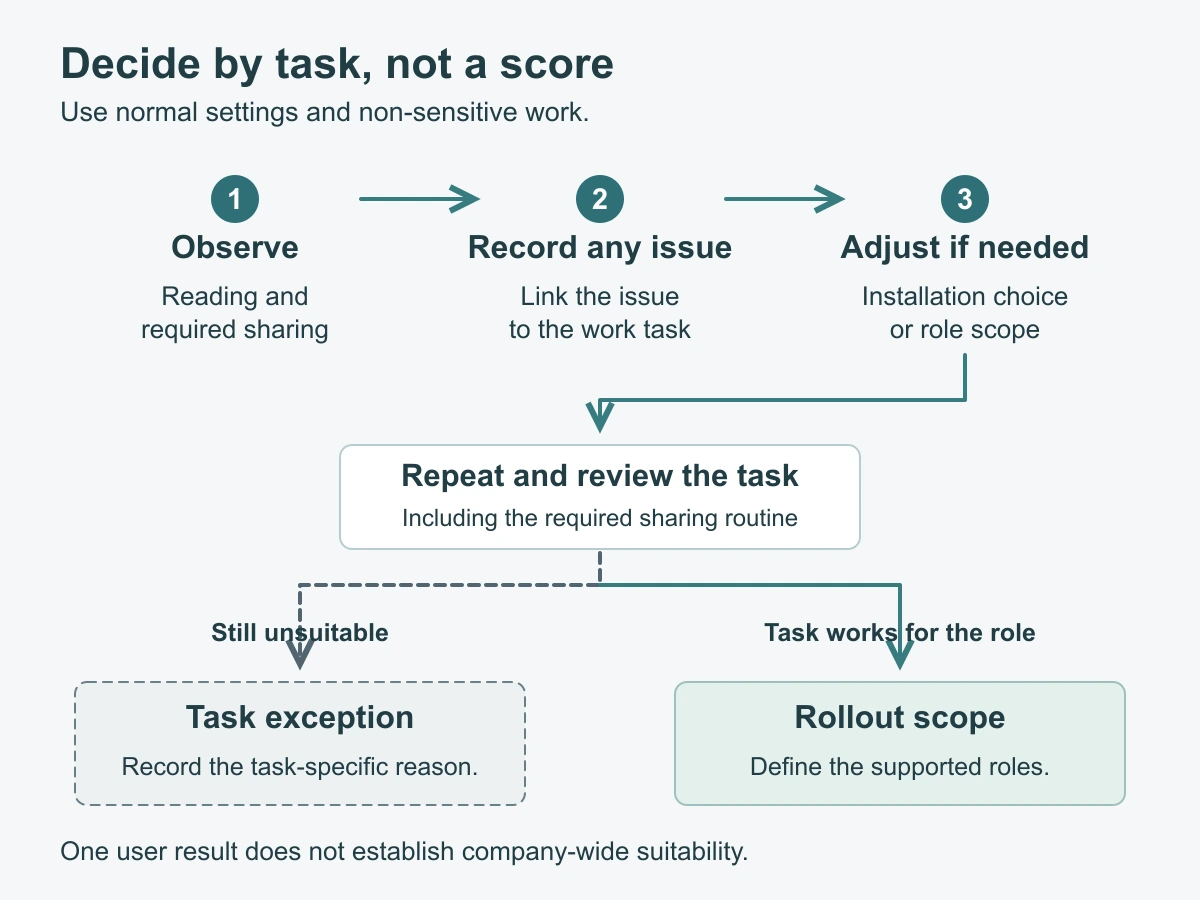
Decide the next rollout step
Adjust the installation choice or scope for the affected role
Choose the next action from the recorded task, not from a desire to issue one accessory to everyone:
- Expand within the observed scope: identify the roles, devices and routines covered, and retain a route for feedback from employees whose work differs.
- Adjust and repeat: change one relevant condition, such as an attachment choice or an agreed sharing routine, then repeat the affected tasks and record the new configuration.
- Keep an exception open: pause that role’s proposed setup while the responsible team selects an alternative consistent with its information-handling requirements.
Compare laptop privacy screen families or monitor privacy filter options when the observation points to a different installation path. A change of method still needs its own device fit review; do not assume it is a direct substitute.
For bulk privacy filter purchasing, turn the role decisions into named configuration groups and quantities. Keep open exceptions separate from the scope ready to order. Revisit relevant tasks when the device, attachment or working routine changes.
Keep medical and compliance claims out of the pilot
Use the pilot to decide whether the named setup supports the observed work. It does not establish eye-health benefits, medical suitability, accessibility compliance or regulatory compliance, and it is not a test of the employee. Route individual support needs through the organization’s existing process without adding sensitive personal details to supplier-facing notes.
Likewise, a user completing a task does not certify a privacy angle or another optical specification. Keep any required product evidence and organizational security review separate from these usability observations.
Request a configuration review with the device and intended use, filter/configuration or drawing reference, quantity and the specific task still needing a solution. Paste a concise summary into the form; send supporting records separately through the site’s provided WhatsApp, Telegram or WeChat options. Use anonymous role and session references rather than employee personnel records.