
Industrial & Custom Displays
Custom Privacy Filters for Industrial Displays: RFQ Checklist
Prepare an industrial display privacy filter RFQ: visible and outer dimensions, drawings, cutouts, touch use, attachment, quantity, samples and packaging.

An industrial display privacy-filter RFQ should describe the display, its outer geometry, the touch and mounting context, and the buyer’s validation path. A generic request such as “custom black filter” leaves too many decisions open for an HMI, POS, kiosk or instrument display project.
This checklist is for an add-on custom PET privacy filter. It helps an engineering or procurement team prepare the information needed for a sample, a material discussion and a written configuration. It does not make a regulatory or application-suitability claim.
Describe the application before the filter
Equipment, operator and environment
Identify the equipment and who operates the display. State whether the application is an HMI, POS terminal, kiosk, medical or laboratory instrument, factory equipment or another display project. Describe the installation environment, enclosure, expected handling and whether the filter is exposed or protected.
The application label helps define the review; it does not by itself establish certification, compliance or suitability. Keep any regulatory or safety requirement as a buyer-supplied specification that needs separate confirmation.
Environment and enclosure
Describe the enclosure, frame, bezel, cover, recess, exposed edge and available clearance. Add temperature, cleaning, handling or other environmental requirements only when they are relevant to the project and can be reviewed against the selected material and installation.
Privacy objective and viewing situation
Explain what information should be less useful to an off-center viewer, where operators stand, and whether the display needs to remain readable from a defined front position. Avoid requesting an absolute privacy result; define the viewing situation and the evidence needed for approval.
Define visible area and outer geometry
Visible width and height
Record the active visible display width and height in millimeters. Identify whether the requested filter covers only the visible area or extends into a frame, recess or bezel. If there is a display ratio or orientation requirement, include it with the measurements.
Profile, radii and cutouts
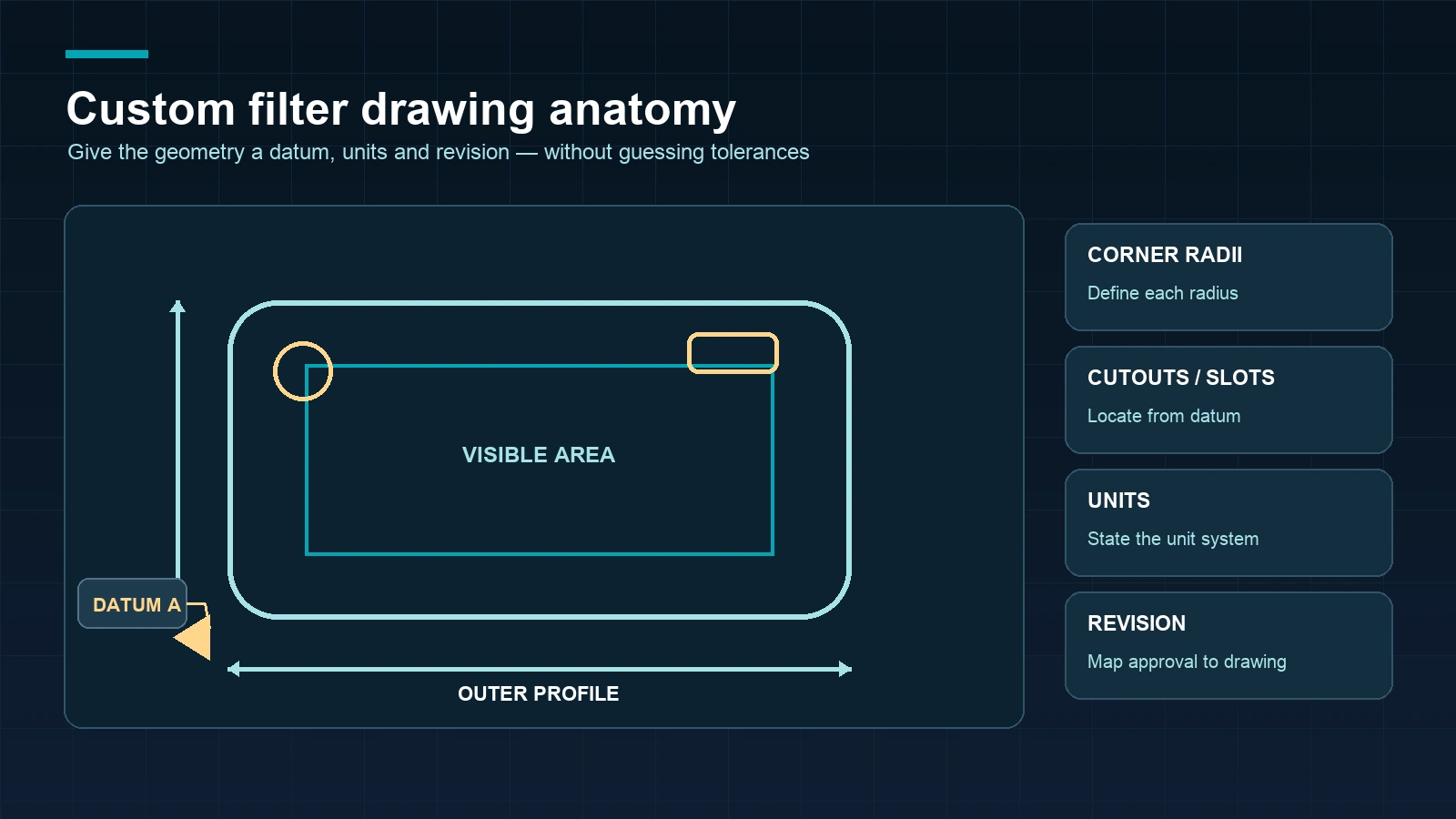
Provide the outer width and height, corner radii, thickness or profile requirements, holes, slots, camera or sensor cutouts, mounting points and any clearance zone. If the filter is shaped around a bezel or enclosure, show the relationship between the visible area and the outer profile.
Datum, units and drawing revision
Use a drawing or marked photo with a clear datum, units and revision identifier. Identify which dimensions are critical, which are reference dimensions and whether the drawing represents the production display, enclosure or an early prototype.
Record touch and display stack
Touch technology and use
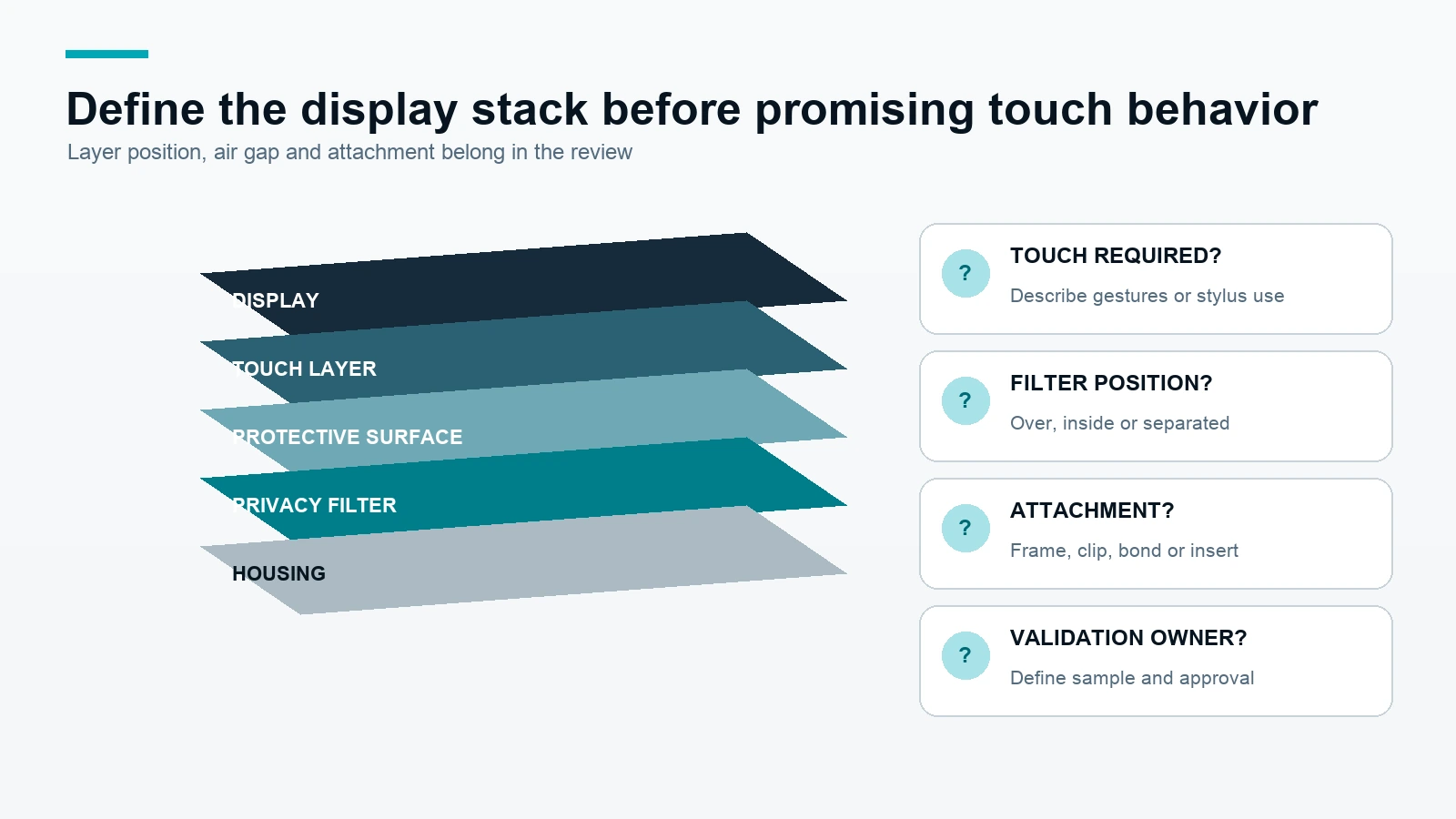
State whether the display is touch-enabled, what touch technology or layer is used when known, and whether the operator touches through the filter. Describe gestures, stylus use or other interaction only when relevant to validation.
Touch compatibility is not a generic promise. It must be reviewed for the exact display, filter material, attachment, surface and installation.
Filter position and air gap
Describe where the filter will sit in relation to the display, touch layer, cover lens and enclosure. Note whether an air gap, frame, adhesive, clip or other retention method is part of the intended stack. If the stack is not yet known, mark it as a design question for the review.
Validation responsibility
State which party will validate touch, optical behavior, fit, cleaning or environmental handling, and what evidence is expected before approval. This keeps the RFQ practical without promising that a generic filter configuration works for every industrial display.
Choose attachment, material and function requests
Attachment and enclosure
Ask whether the filter is exposed, framed, inserted, clipped, bonded, held by a cover or otherwise retained. Include service and replacement needs. The attachment should be selected together with the outer geometry and enclosure, not added as an afterthought.
PET and function version
For this RFQ, identify PET as the requested filter material when that is the intended path. State whether the project needs a privacy function only or also a separate function request such as blue-light behavior. Any function-specific statement requires product and test evidence tied to the selected version.
Packaging and private label
Include individual packaging, bulk packaging, labels, instructions or private-label requirements when relevant. Keep packaging and branding requirements separate from filter geometry and performance requirements so each item can be confirmed in writing.
The industrial display privacy-filter project page provides application context. Review the custom privacy-filter capability and industrial touch-screen custom privacy filter paths before sending the RFQ. For retail terminals, the POS and kiosk display project route may provide a related project context.
Build the complete RFQ package
| RFQ field | What to provide | Why it matters | Confirmation point |
|---|---|---|---|
| Application | Equipment, operator, environment and enclosure | Defines the use context | Project scope |
| Geometry | Visible W × H, outer W × H, profile, radii and cutouts | Defines the physical filter | Drawing or marked photo |
| Display stack | Display, touch, cover, filter position and air gap | Defines interaction and installation review | Technical review |
| Attachment | Exposed, framed, inserted, clipped, bonded or other retention | Defines handling and service | Installation confirmation |
| Quantity and packaging | Sample quantity, production quantity, packing and label needs | Supports quotation and logistics | Written quote or order |
| Evidence and approval | Sample, test scope, photos, drawing revision and approver | Defines the release path | Written approval |
This package is more useful than a generic request because each decision can be traced to a drawing, sample, project requirement or written confirmation.
Sample, review and written approval workflow
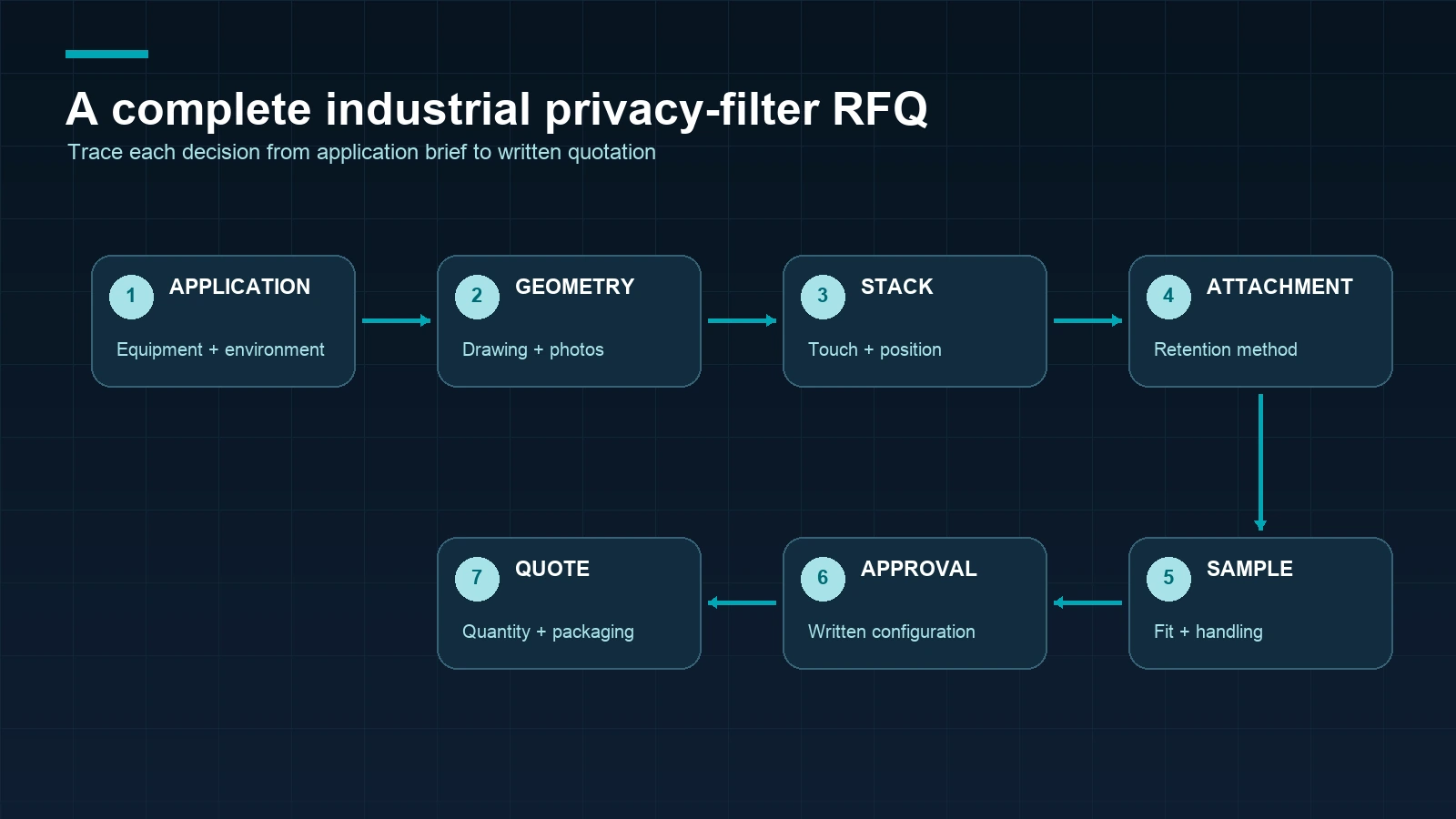
- Application brief: identify the equipment, operator, environment and privacy objective.
- Geometry package: send visible and outer dimensions, cutouts, profile, radii, datum, units and drawing revision.
- Stack and attachment review: describe touch, cover, air gap, enclosure and retention method.
- Configuration discussion: confirm PET or another requested material/function version and packaging needs.
- Sample review: check fit, edge coverage, touch use, handling and the intended viewing situation on the target display.
- Evidence mapping: record what was tested, on which configuration and what remains for the buyer to validate.
- Written approval: confirm final specifications, quantity, packaging, payment conditions and schedule in the written quotation or order.
Regular in-stock products normally ship within 3 days; samples normally take approximately 2–3 days; custom production normally ships within 7–10 days after the relevant details are confirmed. These are general planning signals and do not replace the project-specific written schedule.
Frequently asked questions
What is an industrial display privacy filter?
It is a privacy-filter project for a display used in equipment or a defined application such as HMI, POS, kiosk or an instrument. The filter’s geometry, material, attachment and validation must be matched to the actual display.
Can a standard laptop privacy filter be used on an HMI?
Do not assume that it can. An HMI may require different outer geometry, cutouts, touch-stack review, enclosure clearance or attachment. Send the industrial display drawings and application details for a project-specific review.
What dimensions should an industrial custom privacy filter RFQ include?
Include visible width and height, outer width and height, thickness or profile, corner radii, cutouts, mounting points, clearance zones, datum, units and drawing revision.
Can a privacy filter be used over a touch screen?
It may be possible for a defined configuration, but touch behavior must be validated on the exact display, touch stack, material, attachment and installation. Do not treat a general product image as touch evidence.
Should the filter be inside the enclosure or over the cover lens?
That depends on the enclosure, service routine, edge geometry and display stack. State the intended position or ask for both options to be reviewed in the RFQ.
Do I need a sample before approving an industrial display filter?
When geometry, touch, clearance, handling or viewing behavior matters, a sample is a practical approval step. Map the sample result to the exact drawing revision and configuration.
What should I send for a custom display privacy-filter request?
Send the application, display and enclosure details, visible and outer dimensions, drawing or marked photos, touch context, attachment, material or function request, quantity, packaging, sample needs and approval requirements.
The next step is to submit an industrial display project with the drawing, photos and RFQ fields above.