
Supplier and procurement
Plan a Custom Privacy Filter Launch Backwards from the Required Delivery Date

Plan custom filter approvals, production and transport as separate stages. Work backwards from buyer deadlines using confirmed project dates.
Start with the date the filters must arrive—or be ready for use—then work backwards through receiving, transport, dispatch, production and the approvals that release production. Ask each owner to confirm their part of the schedule. A supplier’s dispatch estimate is not the date your receiving team can expect to use the goods.
For a custom privacy filter project, the useful plan shows what must finish before the next activity can begin. Keep unconfirmed durations blank, identify who will resolve them, and distinguish a requested deadline from a date the supplier has agreed to support.
Separate dispatch from arrival
Production and transport are different stages
Define the end point first. “Delivered to our warehouse” means something different from “available for employee distribution.” Record the destination and receiving window. If the target is ready-for-use, allow a separate period after arrival for the receiving checks and internal handling your team actually needs.
Then distinguish three milestones: production complete, dispatched, and arrived at the agreed destination. Packing, release checks and carrier collection may sit between production and dispatch. Ask whether they are included in the production estimate or need their own activity; count them once, not twice.
Use ScreenWord’s project lead-time guidance as a starting point for the inquiry. For the actual schedule, ask when the quoted clock starts, what it includes, and whether the duration uses working days or calendar days. An approval received late in the day, an unfinished packaging decision or an unconfirmed collection can change the starting point.
Ask the party arranging freight to identify the route, transport scope and destination handover. Establish whether the estimate includes export handling, customs clearance where applicable and final delivery, or whether another owner must plan those steps. Record a transit estimate as an estimate, separate from any agreed delivery commitment.
Map the approval dependencies
Drawing, function, sample and artwork readiness
Freeze a named requirements revision before building the schedule around it. Include the intended device or application, coverage and drawing reference, attachment, requested function, quantity and packaging scope. A custom privacy filter project review can help turn those inputs into a configuration for quotation.
Map the dependencies rather than assuming every approval can run at once. A sample intended to settle fit needs an identified drawing and configuration. Its schedule may include preparation, shipment to the reviewer, hands-on review and a response—not just making the sample. If a revision is needed, add that loop before production release.
Packaging artwork can sometimes progress alongside the sample. However, a layout tied to the final product dimensions or pack format needs those inputs first. Decide which artwork decisions can proceed and which must wait. Bring sample acceptance, packaging approval and the agreed order conditions together at a production-release gate.
This is a planning structure to adapt with the supplier, not a requirement to create an unnecessary sample round for every order. If an existing approved sample covers the named configuration, identify that reference and agree how it will be used.
Who closes each open item
Give every activity a named owner on each relevant side. “Buyer approval” is too broad if engineering selects the drawing, a user team reviews the sample and a brand manager approves the artwork. Identify the person who can close each decision and the person who coordinates the supplier’s response.
For each open item, ask a concrete question: which revision will be reviewed, what input is missing, who responds, and what happens next? Keep the written response with that activity. A scheduling contact can coordinate the dates without silently approving a technical or brand decision for another team.
For device groups, quotation lines and sample records, use the existing mixed-size laptop privacy screen order guide. Carry its configuration references into this schedule instead of rebuilding the order table here.
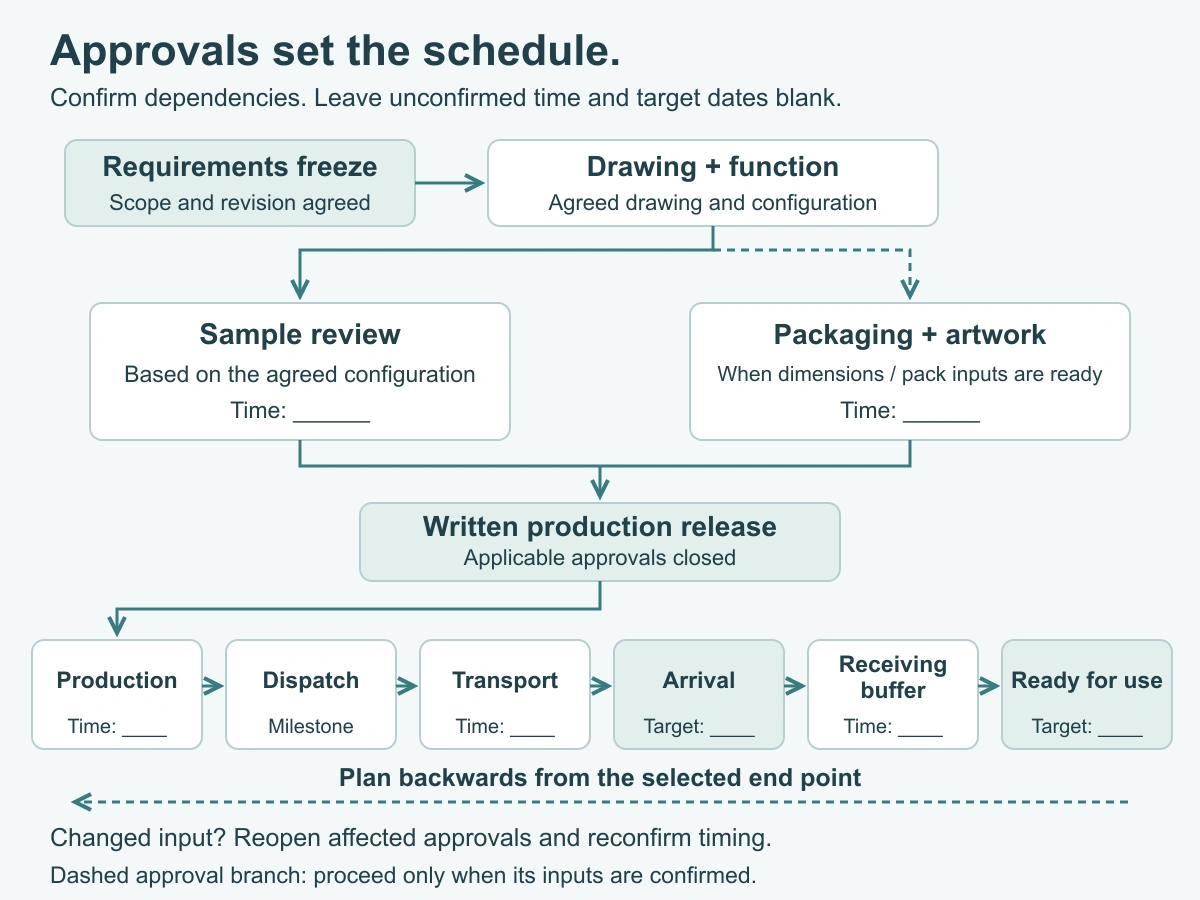
Work backwards with confirmed dates
Use buyer deadlines and supplier responses
Set up the worksheet with a project reference, configuration revision, destination and named end point: arrival or ready-for-use. Record the buyer’s required date separately from the supplier’s proposed dates. Agree the working calendar and the start trigger for each duration before calculating backwards.
If the end point is ready-for-use, work backwards through the receiving period to find the required arrival milestone. If the end point is arrival, keep receiving activities outside that arrival calculation. Next work back through transport to dispatch, through production and release work, and then through the approvals needed to start production.
For a confirmed activity, latest start equals latest finish minus its confirmed duration, using the agreed calendar. A predecessor must finish by the successor’s latest start. If an activity feeds several successors, use the earliest of their required start dates. Parallel branches meet at a shared gate; do not add their durations as though they all run in sequence.
Use the following blank schedule as a starting network. The rows follow the work sequence so dependencies are easy to read; calculate backwards from the selected end point. Role names are suggestions, with space for the actual assignee. Split any combined activity when its owners or timing differ.
| Activity / milestone | Responsible owner / name | Required input or predecessor | Approval or decision to record | Confirmed duration | Latest finish |
|---|---|---|---|---|---|
| A. Freeze requirements | Buyer project lead: ___ | Device/application, quantity, scope and target end point | Requirements revision to schedule | ||
| B. Confirm drawing and function | Buyer technical lead / supplier: ___ | A; drawing and configuration references | Version to use for the sample or agreed review route | ||
| C. Prepare and deliver sample, if needed | Supplier / logistics contact: ___ | B; sample scope and reviewer destination | Sample reference, dispatch and arrival arrangement | ||
| D. Complete sample review | Buyer reviewer / supplier: ___ | C arrival, or agreed prior-sample reference | Accept named configuration or return specific changes to B | ||
| E. Approve packaging and artwork | Buyer brand lead / supplier: ___ | A; confirmed dimensions and pack format; D if needed | Pack and artwork revision; dependencies identified | ||
| F. Release production | Buyer purchasing / supplier: ___ | B, D and E closed as applicable; agreed order conditions | Written release reference and production start trigger | ||
| G. Complete production and dispatch preparation | Supplier production contact: ___ | F; confirmed production slot and materials | Goods ready for dispatch; included packing/release scope | ||
| H. Dispatch | Supplier / freight contact: ___ | G; agreed carrier collection and shipment documents | Carrier handover milestone | ||
| I. Transport to agreed destination | Freight / receiving contact: ___ | H; route, handover and clearance scope | Arrival milestone and status of transit estimate | ||
| J. Complete receiving and readiness buffer | Buyer receiving lead: ___ | I; agreed receiving tasks | Ready-for-use milestone, if this is the end point |
Keep the response reference, start trigger and calendar beside each completed duration in your working copy. For a milestone such as carrier handover, agree whether it is simply a dated event or includes a waiting period; do not assume the blank means zero days.
Leave unconfirmed durations blank
When an input is missing, keep that duration—and any earlier dates that depend on it—open. Name the owner and the next action, such as confirming a sample dispatch slot or obtaining the freight estimate. A target imposed by the buyer is not a substitute for that response.
Once the missing inputs are resolved, check the plan forwards from the earliest feasible start as well as backwards from the deadline. If those views do not meet, discuss an earlier approval, a changed scope, a suitable transport option or a revised target. For a bulk privacy filter purchase, separately released groups may need separate schedules. Any split requires agreed quantities, packaging, freight and timing; it is not an automatic shortcut.
Plan the change response
Which approvals must reopen after a change
Trace the changed item through the dependency network. A revised drawing can affect the sample and dimension-dependent packaging. A changed attachment or function may require another configuration review. A quantity change may leave the drawing untouched but alter material planning, the production slot or packing work. A new destination affects the freight and receiving branch.
Mark only the affected decisions for review, and ask the responsible owners which later activities must wait. Keep unaffected approvals identifiable. This makes the timing discussion specific: “artwork revision changed; confirm its effect on packing and dispatch” is more useful than restarting every approval without a reason.
Confirm revised timing before committing
Issue one revised schedule with the changed configuration reference, affected activities, owners and written responses. Retain the previous version so people can see why a milestone moved. Ask the supplier and logistics owner to confirm the revised dates before communicating them as agreed dates to the receiving or launch team.
Request a configuration review with the device or application, configuration or drawing reference, quantity, destination, required arrival or ready-for-use date, and the timing question to resolve. Paste a short summary into the inquiry form. Share drawings and the working schedule separately through the WhatsApp, Telegram or WeChat options provided on the site.