
Supplier and procurement
Receiving a Bulk Privacy Filter Shipment: Inspect Before Deployment

Inspect bulk privacy filter deliveries against approved references. Record carton evidence, match configuration labels and isolate discrepancies.
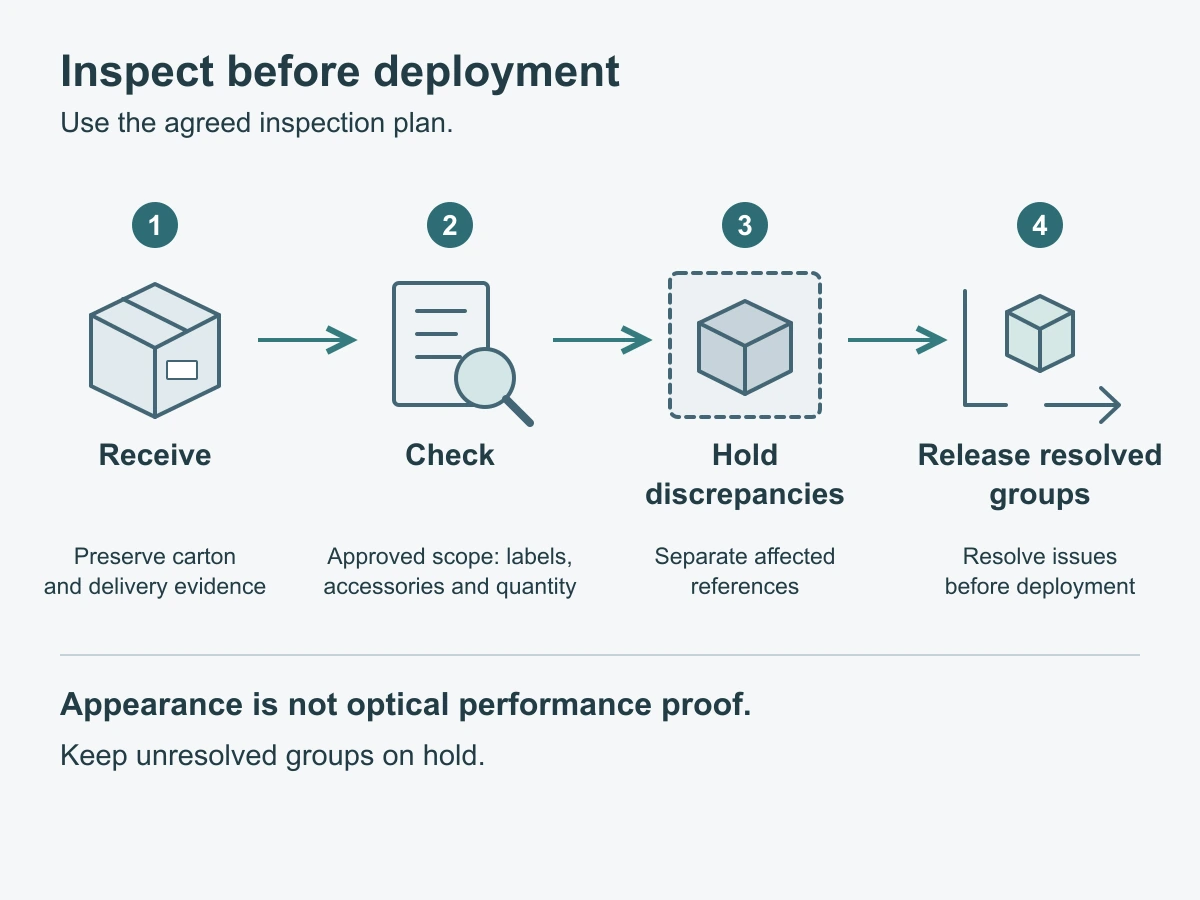
Before distributing a bulk privacy filter shipment, record how it arrived, match the received packs to the approved configuration and packing list, and complete the agreed inspection. Keep damaged or unidentified items separate while the discrepancy is resolved. An intact carton and a correct total count are useful receiving checks, but neither establishes the optical performance of the filters inside.
Use the process below to give purchasing, receiving and deployment teams the same answer to two questions: what has arrived, and which identified quantities are ready to issue?
Preserve the receiving evidence
Outer carton, pack reference and delivery record
Start before removing labels, discarding packaging or mixing the contents of different cartons. Record the delivery date, delivery reference, order reference and number of cartons received against the expected delivery allocation. Keep an outstanding shipment separate from a shortage in a carton that has arrived.
Photograph the shipment overview and readable carton references. Where something looks wrong, take a wider view connecting the affected area to its carton, then a close-up of what you can see. Describe a crushed corner, torn packaging or visible moisture as an observation; do not turn it into an assumed cause or a conclusion about every item inside.
As packs are removed, preserve the link between the carton, inner pack and configuration reference. Keep affected packaging available while the receiving issue is being reviewed. Follow the order’s agreed reporting process and applicable delivery terms for notifications; a general checklist does not set a claim deadline or determine responsibility for damage.
Use neutral filenames or reference IDs for photos so they can be found from the receiving record. Share only the delivery and product details needed for the review, keeping unrelated personal information out of the images.
Match the goods to the approved scope
Configuration label, accessories and quantity
Read the pack identification against the current order confirmation: product reference, device group, attachment method, function version and specification revision where those are part of the agreed labeling. If a label uses a supplier code, use the agreed cross-reference rather than guessing from the pack’s appearance.
Count in the same unit as the packing list. Cartons, individual filters and accessory sets are different quantities. Keep sample items separate from production supply when the order does so. A correct overall total can still contain the wrong split between configurations.
Compare accessories with the contents list for that exact configuration. Count only the separate items actually agreed; a component integrated into the filter is not necessarily a loose accessory. A website photo is not a standard packing list. If a label is unreadable, absent or inconsistent with the contents, retain the original identification and mark the affected packs as unresolved instead of assigning them to the nearest-looking product group.
Use the order by reference rather than rebuilding it
Bring the approved order, packing reference, specification and relevant sample record into the receiving check by reference. Do not re-create the purchasing decision at the receiving bench or substitute an older quotation because it is easier to find.
The mixed-size laptop privacy screen order guide covers setting up those group and configuration references before shipment. At arrival, use them to reconcile this delivery and identify the precise difference. For future bulk privacy filter purchases, agree the receiving references and pack identification before dispatch so the warehouse can recognize each group.
Apply the agreed inspection plan
Sampling scope comes from the contract
Use the inspection plan agreed for the order, including any written instructions incorporated into it. Check which groups or lots it covers, how items are selected, how many are inspected, which characteristics are checked and who can decide the outcome. Do not replace that plan with a convenient carton from the top of the shipment.
Record the items actually inspected and the method used. Keep the inspected count distinct from the total received and from the quantity proposed for release. If sampling is the agreed method, a release decision follows that plan; it should not be recorded as an individual inspection of every filter.
If the sampling scope, acceptance criteria or reference version is missing, ask the purchasing or quality owner to resolve it with the supplier before treating the inspection as complete. This checklist does not supply a default sampling percentage or acceptance limit.
Appearance is not optical performance proof
A receiving inspection can record visible condition, identification, dimensions or attachment details where the agreed plan calls for them. It cannot establish privacy performance merely because the filter looks dark or its surface appears undamaged.
For a required functional check, use the approved sample or specification and the agreed method for the named configuration. Record the device, installation and viewing conditions needed to interpret the observation. Keep a visual comparison separate from a numerical performance claim: an informal look at a sample does not measure an optical value.
ScreenWord’s specification and quality review provides a route for discussing the applicable configuration and references. Ask about the relevant product and requirement, rather than applying a report or sample result from a different material or version to the shipment.
Report and segregate discrepancies
Photos, affected references and hold status
Separate unresolved received goods from stock available for deployment, both in the storage area and in the receiving record. Preserve the original labels and give the issue its own reference. Use “Hold” to mean unavailable for issue pending a decision—not automatically rejected or approved for return.
Classify the observation so the next person knows what to investigate:
| Issue category | What to record | Immediate handling |
|---|---|---|
| Missing item or quantity shortage | Expected and counted quantities, unit of count, missing item name, and the relevant packing-list line | Check the delivery allocation and configuration contents. Record undelivered quantities as outstanding; hold affected received packs if they need the missing item before use |
| Damage | Whether the observation concerns the outer carton, inner pack or filter; affected references, observed quantity and linked overview/detail photos | Keep affected received items identifiable and separate. Record the condition without assuming transport or manufacturing caused it |
| Identity unclear | Missing, unreadable or conflicting label; carton/pack reference and what it conflicts with | Hold the affected packs until their configuration is established. Do not relabel them from appearance alone |
Arrival discrepancy report — copy and complete for each issue
Use a separate report for a different configuration or issue type. Blank entries are for the actual shipment; no inspection results are supplied here.
| Field | Shipment details to complete |
|---|---|
| Report identification | Report ID: ___; receiver: ___; date: ___ |
| Delivery identification | Delivery reference: ___; arrival date: ___; order and revision: ___ |
| Affected goods | Configuration/group: ___; specification revision: ___; lot or batch reference if supplied: ___ |
| Packaging references | Packing-list revision and line: ___; carton IDs: ___; inner-pack references: ___ |
| Issue category | Missing item / damage / identity unclear: ___; specific observation: ___ |
| Quantity reconciliation | Unit of count: ___; expected in this delivery: ___; actually received: ___; outstanding shortage: ___ |
| Accessory detail, if relevant | Item required by confirmed contents list: ___; expected: ___; found: ___ |
| Inspection scope | Agreed plan and reference/sample: ___; items actually inspected: ___; method and observed affected count: ___ |
| Evidence | Photo/file references: ___; carton-to-pack mapping: ___; relevant delivery note: ___ |
| Current hold | Received quantity on hold: ___; unit: ___; physical location: ___; inventory hold reference: ___ |
| Action owner | Responsible buyer/quality contact: ___; supplier discussion reference: ___; next action: ___ |
| Resolution record | Agreed action and date: ___; corrected reference or replacement delivery reference, if any: ___; required recheck and result: ___ |
| Final disposition | Hold / released / other agreed disposition: ___; exact configuration and quantity: ___; decision reference, authorized person and date: ___ |
| Remaining open items | Outstanding shortage: ___; received quantity still held: ___; unresolved question: ___ |
When a sampled item has a problem, distinguish the number observed from the wider quantity held pending review. Do not report an uninspected group as confirmed damaged. Likewise, a missing quantity cannot be counted as physically present in the hold area.
Send the concise report reference and the difference to ScreenWord’s contact channel when supplier input is needed. Keep the photos and order references connected to that report. The agreed order terms govern any remedy; recording an issue does not itself establish a replacement or refund arrangement.
Release only resolved groups
Release an identified group or quantity only after the required receiving checks are complete and any issue affecting that release has been resolved through the agreed process. Record the decision, the person authorized under your receiving procedure, the quantity released and anything still held or outstanding.
A supplier reply alone is not a completed recheck. If identification is corrected, verify it against the goods; if a missing item arrives, reconcile that delivery; if replacements are supplied, complete the applicable receiving checks before issuing them. Keep the original discrepancy linked to the resolution rather than deleting it.
Unaffected groups can proceed separately where the agreed inspection and release plan allows it. Do not change the whole shipment to “released” while part of it remains unresolved. This keeps deployment moving without losing track of the packs that still need attention.
Request a configuration review with the device or intended use, order/configuration or drawing reference, quantity and the specific question to resolve. Paste a short summary into the form; share the report and supporting files separately through the site’s provided WhatsApp, Telegram or WeChat options. The form does not transmit attachments.