
Mobile work
Choosing a Privacy Filter for a Portable Monitor: Stand, Ports and Sleeve Fit

Check a portable monitor’s stand, ports, controls and protective sleeve before requesting a privacy filter configuration.
Choose a privacy filter for a portable monitor around two states: working with the stand open and cables connected, and carrying the display with its stand folded and sleeve in use. A filter that covers the visible screen may still get in the way of a connector, a control or the packing routine. Start with those everyday actions, then select the proposed attachment and removal routine.
For a mobile-work kit, the useful question is not just “does it fit the screen?” It is “can the user set up, work, share the display and pack it away as intended?” The following checks are a planning aid for a sample discussion, not a record of a completed test.
Inspect the portable monitor in both use states
Open stand and connected cables
Set out the monitor with the stand or support normally used for the job. Identify its exact model, the cable and connector arrangement, and the controls the user needs during work. Begin with the normal setup before introducing the candidate filter so an existing obstruction is not attributed to the new accessory.
Look beyond the front rectangle. A connected plug occupies space outside its port, and the user needs access to insert or remove it. A button needs room for the user’s finger. Follow the device’s instructions when adjusting the stand, and note where its moving parts travel through the positions used at work. Do not invent a clearance allowance from a photo or push the stand beyond its intended movement.
Use fictional content for a normal task on the display. Include any switch between private work and showing the screen to someone else; that helps identify when removal would be useful.
Folded position and the original protective sleeve
Keep the original sleeve, cover or carrying case with the sample setup. Identify which item is actually used, whether it also acts as a stand, and the device maker’s instructions for folding and packing. Do not assume every portable display uses the same cover arrangement.
Record whether the proposed routine is to leave the filter installed or remove it before carrying. If removal is planned, include where the filter will be stored separately. If keeping it installed is requested, leave that packing condition open until the specific arrangement is reviewed.
Mark these two check areas on photos of the actual device, or use them as text prompts:
Work-state check map
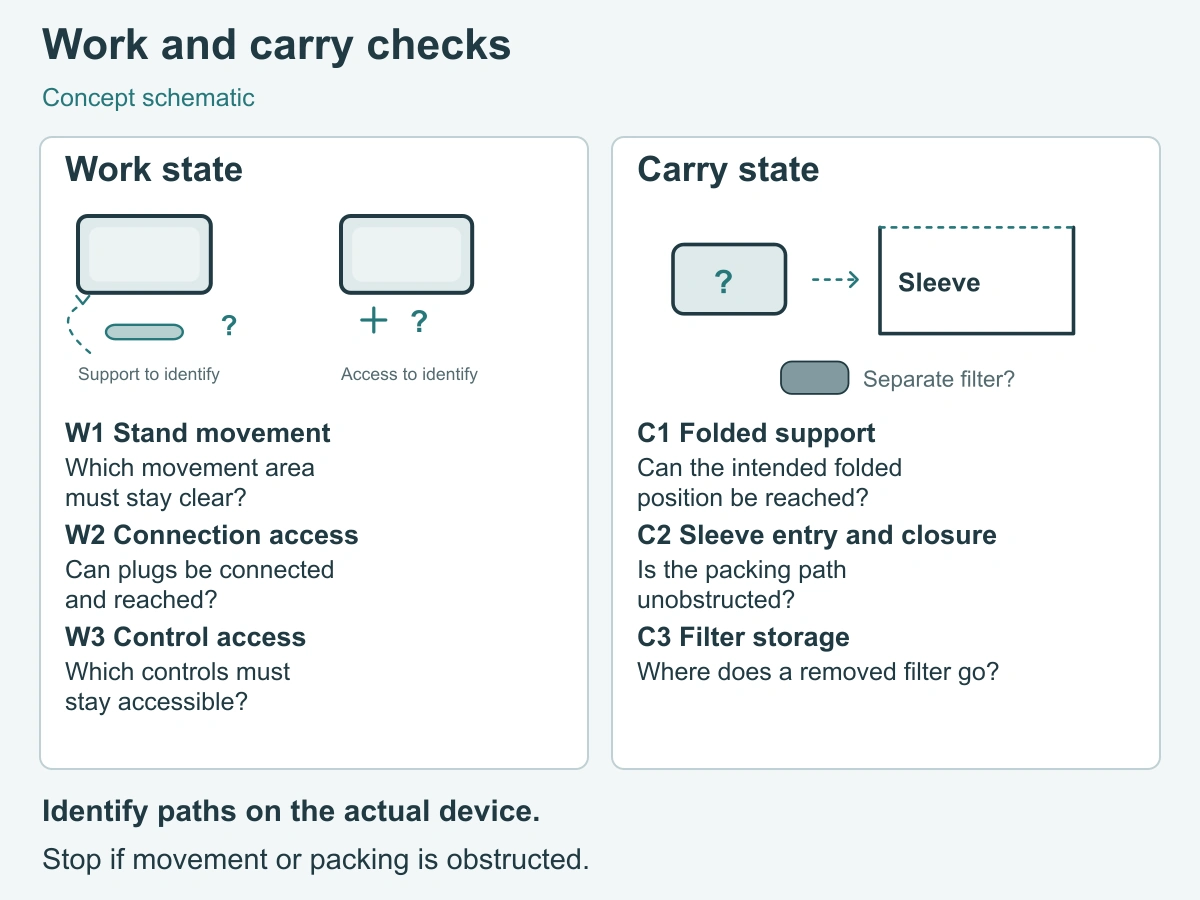
- W1 — Stand movement: identify the movement needed for normal setup and the places the proposed attachment must avoid.
- W2 — Connection access: identify the actual ports in use, space occupied by their plugs, and access for connecting and disconnecting.
- W3 — Control access: identify buttons and any openings the device instructions require to remain clear.
Carry-state check map
- C1 — Folded support: identify the stand or cover’s intended folded position and any candidate part that could interrupt it.
- C2 — Sleeve entry and closure: identify the insertion path and any closure, where present, without forcing the device or sleeve.
- C3 — Filter storage: identify whether removal is planned and where the removed filter will be protected and kept with the kit.
Use this record for one device, support, sleeve and proposed filter. Fill the reference and planned arrangement first; leave observations blank until the actual sample check.
| State / check | Planned arrangement or question | Device / instruction / photo reference | Actual observation | Next action |
|---|---|---|---|---|
| Work — W1 stand movement | Which working positions and moving areas must stay clear? | |||
| Work — W2 connection access | Can the required plugs and connection actions remain accessible? | |||
| Work — W3 control access | Which controls and specified openings must remain clear? | |||
| Carry — C1 folded support | What is the intended folded position, and could a candidate part obstruct it? | |||
| Carry — C2 sleeve entry and closure | What packing path does the device maker specify, and is keeping the filter installed proposed? | |||
| Carry — C3 filter storage | If removal is planned, where will the filter be protected and stored? |
Choose the attachment around moving and accessible parts
Keep ports, controls and the stand path usable
Compare the proposed attachment locations with W1, W2 and W3 before concentrating on how quickly the filter comes off. A useful arrangement needs to leave both the component and the user’s action accessible. Seeing a port is not the same as being able to grip the plug beside it.
For a permitted sample installation, repeat the normal setup with the same stand and cables. Check the positions the employee actually uses, not an extreme position chosen to make the accessory appear workable. Note any need to reroute a cable, change the support position or remove the filter to reach a control. Those observations help decide whether the routine suits the job.
If a part interrupts movement or access, describe the location and the action affected. Request a revised arrangement rather than trimming the filter or relocating attachment parts without instructions.
Do not assume a desktop hanging solution suits a portable display
A hanging format must be considered with its support geometry and handling routine. A desktop monitor housing and a portable monitor’s stand, cover and sleeve are different contexts; a shared diagonal size does not settle those differences.
The monitor privacy screens page provides starting product routes. The existing office-monitor buying checklist explains the broader installation choices. For a portable display, narrow the comparison to whether the proposed configuration leaves the moving and accessible parts usable and supports the intended packing routine. Do not select a desktop hanging option solely because its screen-size label appears suitable.
Check packing and unpacking without force
Use the device maker’s sleeve instructions
Use the instructions for the exact monitor and sleeve, including the required device state, cable handling and folding sequence. If the sleeve is a replacement or a third-party accessory, identify it separately and check its instructions too. A photo of the monitor already inside a sleeve does not explain the permitted packing sequence.
For a candidate review, first understand the normal packing routine without the proposed filter. Then review the planned filter routine only where the device and accessory instructions permit it. A removable filter may be considered for a remove-before-packing routine, but its own handling and storage instructions still matter.
Include unpacking in the discussion: where the filter is placed while the monitor is set up, when it is reinstalled, and how the user keeps it with the kit. This makes the routine repeatable for someone receiving the equipment for the first time.
If additional thickness or a part obstructs closure, do not press it into place
Stop if the proposed setup catches at the sleeve opening, prevents the stand from folding as intended or obstructs a closure. Do not squeeze the display, stretch the sleeve or force a folding part to obtain a closed package.
Record where the obstruction occurs and whether the candidate was installed or stored separately. Where removal is permitted, return to the normal setup to distinguish an accessory-related change from an existing packing problem. Ask about a revised configuration or a different documented storage routine; do not improvise a clearance by cutting, bending or adding pressure.
Prepare a portable-display sample request
Exact device, stand and sleeve photos plus intended removal routine
Send a compact set of references that shows both states:
- The exact monitor model and the actual work or presentation task.
- A front photo with the stand in its normal working position, plus views of the stand movement area and connected edges.
- The sleeve or cover reference and photos showing the folded support and packing opening before insertion.
- The proposed filter or configuration reference, with a clear leave-installed or remove-before-packing preference.
- The quantity and the unresolved action, such as reaching a control or packing the display with the candidate present.
Keep any sample notes tied to the same device, stand, cables and sleeve. If one of those changes, revisit the checks it affects. ScreenWord’s ability to supply the particular portable-display configuration and its fit must be confirmed for that request.
Use the existing worksheet for measurements instead of repeating them
Use the privacy filter measurement worksheet for visible dimensions and existing fit inputs. Add the two-state record rather than starting another measurement table. Use a custom privacy filter project review when the proposed coverage or attachment needs to be considered around the portable setup.
Request a configuration review with the device, task, proposed configuration, quantity and open question. Paste the summary into the form; share photos, instructions and sample notes separately through the WhatsApp, Telegram or WeChat options provided on the site.