
Workplace Privacy
Plan Privacy Filters for a Dual-Monitor Desk Without Blocking Collaboration

Map private and shared tasks across a dual-monitor desk. Review each display position and removal routine before selecting privacy filters.
Plan each display separately. Assign sensitive work, shared content and the user’s normal viewing position to each screen before choosing a filter or attachment. Two monitors on the same desk do not necessarily need the same configuration: one may hold private records while the other is regularly turned toward a colleague.
Start with the tasks people actually perform, including what happens when they turn their chair or move a window between displays. The aim is to keep the intended work readable and make collaboration deliberate, without assuming that one filter choice solves every view around the desk.
Assign a job to each display
Sensitive work versus collaborative content
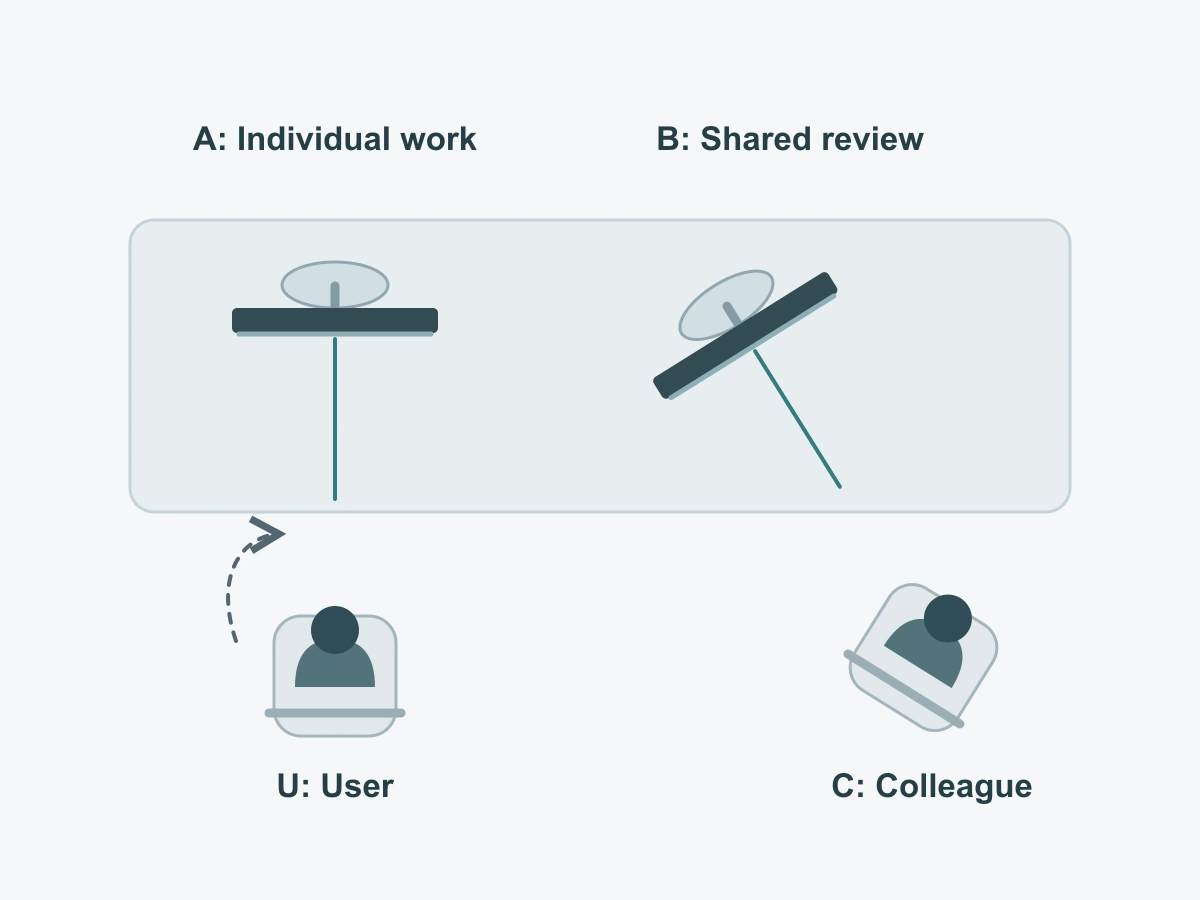
Name the displays A and B on a desk photo or sketch. Identify which is primary for the role and what the secondary display does. These are task labels, not instructions to put a particular model on the left or right.
For example, a worker might keep an internal case record on A and prepare a customer-facing summary on B. That arrangement only helps if the summary excludes private details and the worker avoids dragging the case record onto B during the discussion. A secondary screen used for a mailbox or messaging application may carry sensitive information too.
If both screens handle private material, describe both as private-work displays. If either becomes a shared display during the day, record that change rather than describing the whole desk simply as “confidential.”
Which screen changes orientation
Include swiveling a monitor toward a colleague, moving an arm, turning the chair and rotating a display into portrait. A display that stays still during solo work may move repeatedly during reviews. Note which changes are routine and who makes them.
Use this example as a role map, replacing the tasks and positions with those at your desk. It is a planning example, not a tested layout.
| Desk element | Solo-work role and position | During a shared review |
|---|---|---|
| Display A: primary | Internal working record; user normally faces this display | Keep private content closed or out of the shared view; do not assume a colleague looking at B cannot also see A |
| Display B: secondary | Reference material or preparation of a non-sensitive summary | Show the prepared summary; record whether B swivels, rotates or stays in place |
| User position U | Mark the normal seated position and the center of each display relative to it | Mark where the chair turns or moves when attention shifts to B |
| Colleague position C | Mark the usual side of the desk and any nearby standing position | Mark the actual shared-view position, including the colleague’s possible view of A |
On the same sketch, draw a short line straight out from the center of each screen face. Label the lines A and B, then mark U and C. These two centerlines show which way each display faces; they are not privacy boundaries or recommended desk angles. Add arrows only for movements that actually happen at the workstation.
Map the real viewing positions
Normal seated position and a colleague beside the desk
Sit as you normally work, with the applications and text sizes used for the job. Use fictional information while checking the arrangement. Look at A, then at B, without first changing the desk to make the comparison easier. Note whether you lean, slide the chair or turn substantially to read either screen.
Have a colleague use the usual side seat or standing position. Ask what is readable on each display separately. Their intended task may be to view B, but their line of sight to A still matters. Include a nearby aisle if people commonly stop there; do not substitute an unusually distant observer for the real working situation.
Repeat the check after the normal chair turn or screen movement. The user’s position relative to B can change even when B does not move. Likewise, swiveling B toward a colleague changes its viewing relationship with the rest of the room.
Check each display independently
Readability on one screen does not establish readability on the other. Different facing directions, content and mounting conditions can produce different observations even with matching monitors.
For each display, complete the following short list under its A or B reference:
- Task: private work, shared review or a defined switch between the two; name the application or content type without including sensitive data.
- User view: normal seated position relative to that screen’s centerline, plus any routine chair movement.
- Other views: colleague’s seat, standing position and relevant aisle; note which view should remain available for collaboration.
- Movement: fixed, swivel, arm movement or portrait/landscape change; identify the working states to check.
- Device and attachment: exact monitor reference, existing fit record or visible width and height in millimeters, aspect ratio, bezel and edge conditions, mounting clearance and preferred installation.
- Handling request: whether removal is needed, who will do it, where the panel will go and any unresolved question from the desk check.
Keep observations with their screen reference. “B becomes difficult to read from the normal chair after it is turned” is actionable; “the desk does not work” is not. If the user has to adopt an awkward position, revisit the arrangement or candidate configuration instead of treating that posture as the normal way to use a filter.
The existing monitor privacy-screen buying checklist covers fleet inventories and fit inputs in more detail. Use that record by reference rather than creating a second set of measurements for this layout discussion.
Choose when a filter should be removable
Shared review routines and where the panel goes
A removable option is worth considering when a screen regularly changes from private work to a wider local view. If B is the collaboration display, it may need that routine more often than A. If both screens remain private and rarely change audience, daily removal may add handling without helping the job.
Compare monitor privacy filter options after describing those routines. The magnetic monitor privacy screen is a removable PET route; select it against the actual monitor edge and configuration rather than assuming every monitor provides the same attachment conditions.
Decide where the removed panel belongs before choosing the routine. Use a designated protective location appropriate to the supplied product, reachable without laying the panel across the keyboard, another screen or the edge of the desk. This location is part of the workstation plan; it does not imply a storage accessory is included with the filter.
For a local review, prepare suitable content first, remove the filter only as its instructions allow, and place it in that location. Check both displays before inviting the colleague to look. When the review ends, restore the intended screen and filter arrangement before reopening private work.
No assumed privacy across every seat
A useful distinction is between the user’s intended viewing position and other viewing directions. Photodon’s privacy-filter FAQ describes this front-versus-side distinction for its products; it does not establish a ScreenWord angle or performance result.
Apply that distinction to each screen and each working state. A colleague who moves closer to the user’s position may gain a view that was not available from the side seat. A screen turned for collaboration may expose content to someone beyond the intended colleague.
If a private task cannot be kept appropriate for the occupied positions, close or move that task before sharing. Do not solve a content problem by assuming a filter creates an invisible boundary around the whole desk.
Prepare a desk-layout inquiry
Two display references, task map and open issues
Send A and B as separate display references, even if the models match. Include the role map, normal and shared-view positions, each screen’s fit information, removal preference and planned storage location. Add a desk photo or sketch with fictional or hidden screen content, and describe the movement that raised a question.
For several desks, use bulk privacy filter purchasing and group only arrangements that share the relevant device and handling conditions. State quantities by requested configuration; a dual-monitor workstation does not by itself mean two identical filters.
Request a configuration review with the device references, task summary, configuration or drawing reference, quantities and open questions. Submit the summary in the form first, then share supporting files through the WhatsApp, Telegram or WeChat options provided on the site.