
Workplace Privacy
Choosing Privacy Filters for Hot Desking: Shared or Employee-Issued?

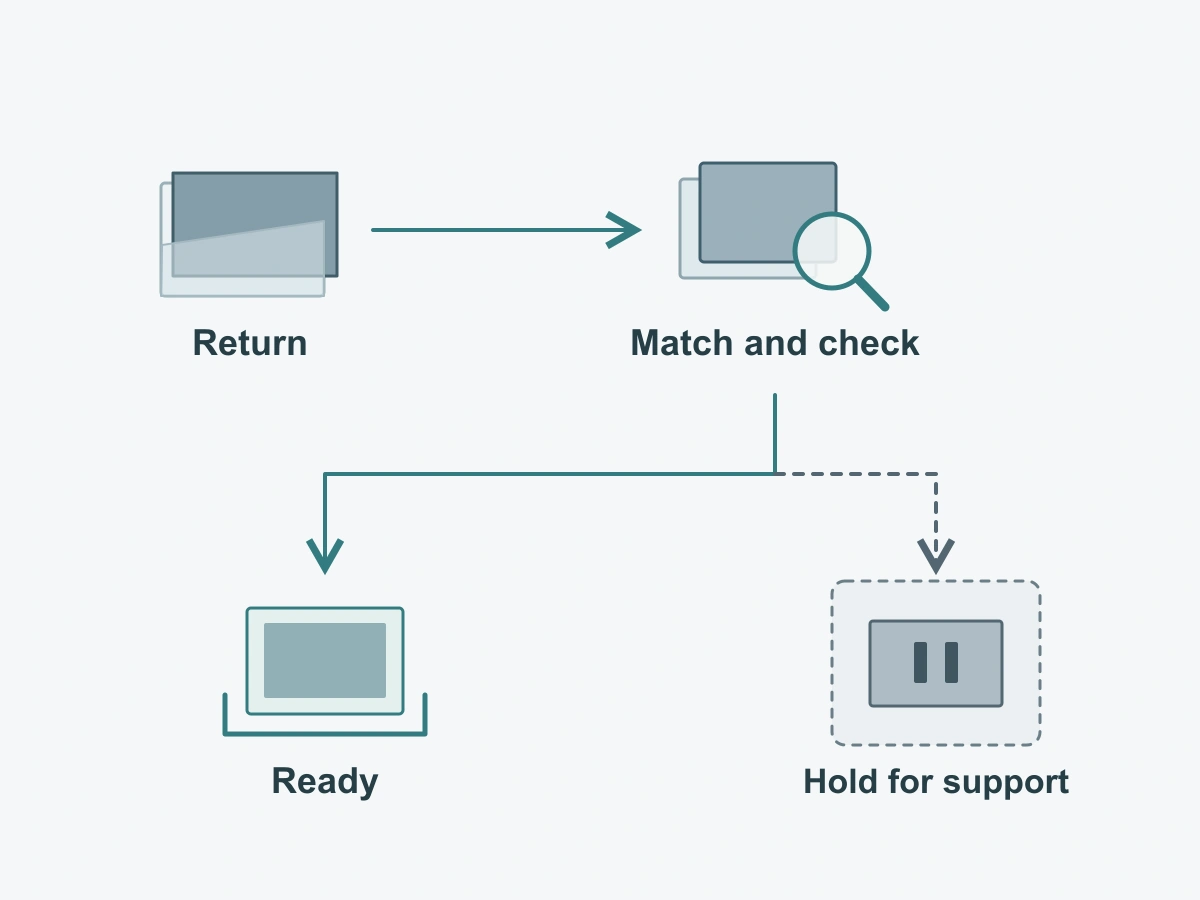
Define how shared-desk privacy filters are assigned, returned and checked. Keep device matching and unresolved equipment separate.
Decide whether the filter belongs with a particular device or travels with an employee, then define how it is matched, returned and set aside when something is wrong. Buying enough filters is only part of a hot-desking plan. The next user needs the correct, complete setup and a clear way to switch between private and collaborative work.
Use device-bound filters where the display stays at the desk and the team can maintain a consistent setup. Consider employee-issued filters where the employee carries a known laptop or uses destinations with confirmed fit. A mixed office can use both approaches without treating every filter as interchangeable.
Choose shared or employee-issued filters
Device-bound filters reduce daily matching work but must allow needed collaboration
A device-bound filter stays assigned to the same monitor or laptop even when its users change. Keeping the reference with that device reduces the need to choose a different filter at every arrival. It also makes the desk the natural place for the handling instructions and designated storage.
The shared desk still needs a collaboration plan. If users regularly show the physical screen to colleagues, decide whether the supplied configuration supports removal and how it is restored afterward. If it is not intended for routine removal, offer another suitable way to share the material rather than expecting each user to improvise.
Device-bound does not mean permanently attached. A removable panel can remain assigned to the desk while being stored separately during a discussion. The assignment describes where it belongs, not how it attaches.
Personal removable filters move with employees only when the destination fit is confirmed
An employee-issued filter works most simply when it travels with the same device. Moving the employee’s laptop to a different desk does not turn its filter into an accessory for that desk’s monitor.
Where employees use different displays, define the destinations or device group the filter has been selected for. If a new desk is outside that group, use its matched equipment or contact support. A familiar diagonal label or a panel that looks close in size is not enough to transfer the setup.
| Decision | Device-bound, shared by desk users | Employee-issued, carried by the user |
|---|---|---|
| Best starting situation | The display remains at the workstation and different people use it | The employee carries a known device, or destination fit has been established |
| Matching at arrival | Match the desk’s display reference to its assigned filter | Match the filter to the device being used, not merely to the employee |
| Private-to-shared switch | Users follow the same desk routine; removal depends on the selected attachment | The employee follows the issued product’s routine and keeps the removed filter with their kit |
| Storage responsibility | A defined desk or support storage point remains available to every user | The employee needs an appropriate protective location while moving or sharing |
| Main management trade-off | The next user depends on the previous handover and a complete desk setup | The filter must arrive with the employee and remain matched as devices change |
| When to reconsider | Frequent missing parts, unclear returns or sharing needs that the setup does not accommodate | Repeated destination mismatches, forgotten equipment or a change of assigned device |
These are assignment choices for the workplace, not claims that one method has a lower loss rate. Choose against the devices and routines you actually have.
Design the change between private and shared work
Check who can remove the filter and where it can be stored
Give the desk a short, usable instruction: who may remove the filter, which supplied instructions to follow, where it goes during sharing and who restores the setup. Name a support role for uncertain actions. An unfamiliar user should not need to guess whether a strip, clip or panel is meant to come off.
Before exposing the screen to a colleague, prepare suitable material and close unrelated private content. Use the removal routine only if the selected configuration permits it. After the discussion, restore the intended arrangement before returning to private work.
Choose the storage point as part of issuing the equipment, with protection appropriate to that product. Keep it distinct from the return area for unresolved items. Do not prescribe the same folding, stacking, cleaning or adhesive reuse method for different filter types; keep the product’s supplied handling and care instructions with its reference.
Avoid universal-fit assumptions across different desks
A booking for a “standard desk” does not identify the actual display. Monitor replacements, different laptop families, edge geometry and existing attachments can change what fits. Keep the matching information tied to the device, and update it when equipment is replaced.
The laptop privacy screen families and monitor privacy filter options are separate selection routes. Use the appropriate route to establish the configuration, then give users a recognizable device and filter reference. Avoid a single pool labeled only “universal.”
If two desks use different confirmed configurations, distinguish their storage locations or kit references. Put identification on the storage container or an approved label location, not on an unverified optical or attachment surface. This makes selection clearer without inventing a new product modification.
Make the daily routine simple
Identify the desk and matching filter at pickup
The useful handover is short enough to do when starting work. It should answer which device this filter belongs to and whether the expected setup is ready.
- Identify the destination. Match the actual device or desk reference to the filter reference before taking it into use. Check again if the device has changed since the last visit.
- Check the kit. Compare it with the contents specified for that issued configuration and look for obvious damage, an uncertain attachment or missing items. Do not assume every product includes the same accessories.
- Use the stated routine. Follow its installation and private-to-shared instructions, using the designated storage location when removal is permitted.
- Return to the correct place. Restore the desk setup or return the complete kit to its matching location. Report any mismatch, missing item or damage through the named support route instead of leaving it for the next person.
For an employee-issued setup, the same sequence applies when equipment is handed back to support or reassigned. It need not create a daily borrowing form for a filter that stays with the same employee and laptop. Keep any record proportionate to the handover.
Return an incomplete or damaged kit to support, not the next user
Keep unresolved equipment out of the ready-to-use pool. Place it in a separate support location with the device/filter reference and a brief description such as “attachment missing” or “panel does not match desk display.” This is an equipment hold, not a claim about contamination or a diagnosed manufacturing defect.
Do not restore availability simply by putting the item back in its usual slot. Support should establish the correct match, replace or resolve the affected part as appropriate, and check the configuration before releasing it. If the problem cannot be resolved immediately, offer a confirmed alternative or another suitable workstation for the task.
Avoid borrowing a loose component from an unrelated kit to make the return appear complete. Preserve the identity of both kits, and follow the supplier’s instructions for any replacement. A short description of what was found is more useful than an unsupported explanation of why it failed.
Use recurring problems to adjust purchasing
Track actual missing parts or wrong-fit incidents
Record a few operational facts when a problem occurs: device or desk group, filter configuration, issue observed, effect on the task and action taken. Keep employee details within the organization’s existing access-controlled process rather than displaying a public list at the shared desk.
Separate different causes. A filter not returned to its location, a wrong kit selected and a display replaced without updating its reference call for different responses. Treat a report as an observation to investigate, not proof that the product or employee caused the problem.
Use these events when reviewing the setup. There is no need to invent a percentage of expected losses, set an arbitrary replacement interval or build a detailed borrowing ledger before learning which issue actually interrupts work.
Change the kit or assignment method rather than invent a loss rate
If mismatches recur across different desks, consider keeping filters with the devices or narrowing the employee-issued destinations. If users repeatedly remove a shared panel but have nowhere to put it, address storage and the chosen attachment routine. If private and collaborative tasks conflict, reconsider how the workstation supports both before simply ordering more of the same item.
Describe the proposed change through bulk privacy filter purchasing, with device groups, quantities, assignment method, handling needs and any unresolved fit question. Base spare quantities on actual use and support experience rather than a made-up loss allowance.
When that requirement is ready for quotation, the mixed-size laptop privacy screen order guide explains how to connect groups to quote lines, samples and delivery instructions. Carry forward the configuration references from everyday use so procurement addresses the issue that was observed.
Request a configuration review with the device groups, current assignment method, proposed change, configuration or drawing reference, quantities and open questions. Submit a summary in the form first; share supporting files afterward through the site’s WhatsApp, Telegram or WeChat options.