
Workspace accessory comparison
Monitor Hood vs Privacy Filter: Compare Glare Control, Side Views and Desk Access

Compare a monitor hood and privacy filter by the problem they address, their physical layout and access needs before choosing a workplace accessory.
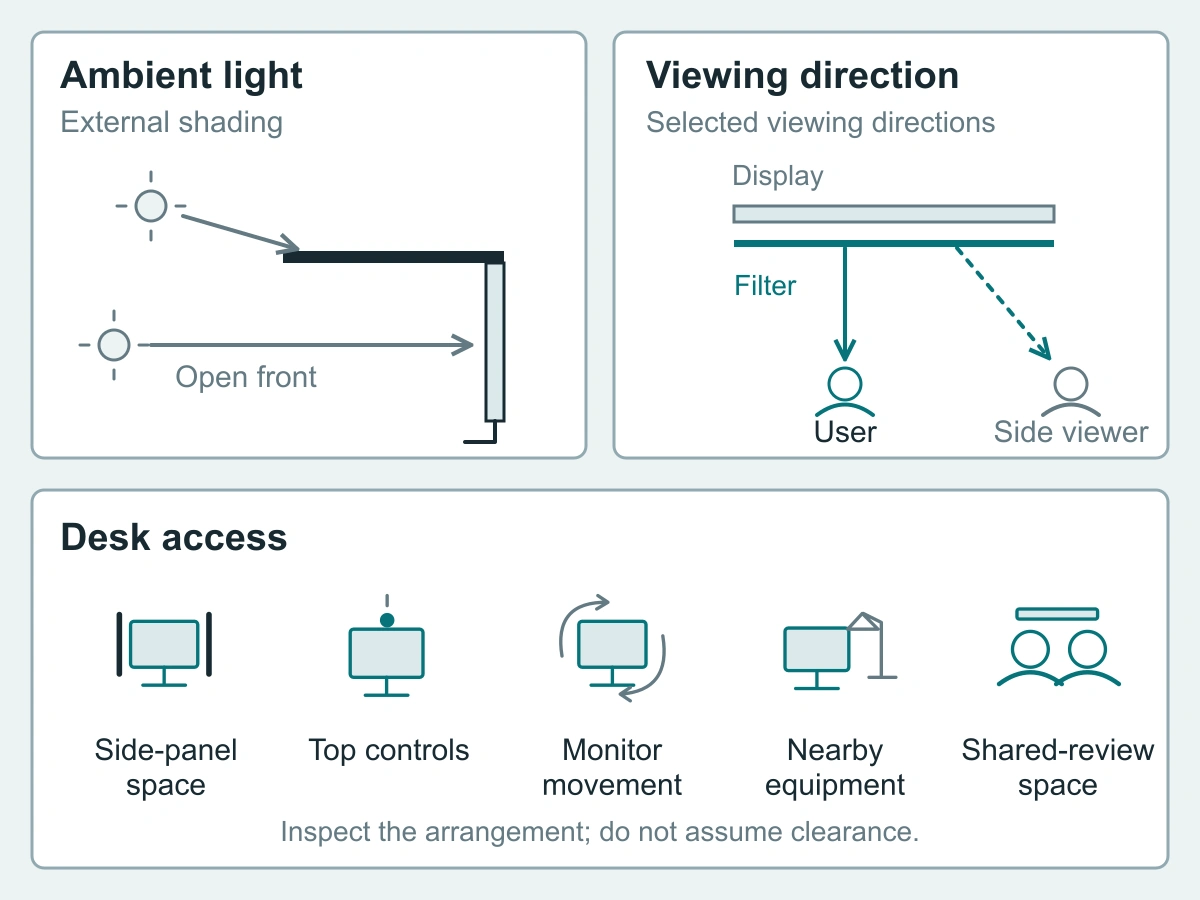
Consider a monitor hood when the problem is ambient light reaching the screen. Consider a privacy filter when the problem is nearby people reading sensitive content. A hood shades some incoming light paths; a privacy filter acts in front of the display to restrict selected viewing directions. They solve different problems and occupy different parts of the workspace.
Start with the source of the interruption, then check whether the proposed accessory leaves room to move the monitor, reach its controls and review work with a colleague. A hood is not an all-direction privacy guarantee, and a privacy label alone does not establish glare control.
Compare the physical jobs of the accessories
A hood shades the display from some ambient light paths
A monitor hood extends around the display rather than covering the viewing surface with a filter. Its panels sit between some surrounding light sources and the screen. EIZO’s monitor-hood overview identifies ambient-light glare as the purpose of its light-shielding hoods; that supports the general distinction, not a result for every desk.
The direction of the light matters. A top panel and side panels cannot intercept every possible incoming path through the open front. Look at where the troublesome light originates and how the display normally faces it before deciding whether a hood addresses the problem.
Ambient-light path: room light → some paths intercepted by an external hood panel → less direct access along those paths to the display surface. Other incoming paths remain possible.
A privacy filter addresses visibility from selected viewing directions
A privacy filter sits in front of the display and is intended to make content less useful from selected off-center positions while supporting the intended user’s view. The relevant direction belongs to the chosen filter and installation, not to the desk’s side panels.
Viewing path: display → filter in front of the screen → intended user and off-center viewers. The selection question is which nearby viewing positions need to be restricted.
Keep those two paths separate. A hood panel may physically obstruct a particular person’s sightline, but its presence does not establish privacy from every position. Equally, a filter should not be selected as a solution to every lighting problem simply because it is called a privacy screen.
Choose for the problem in the workspace
Glare without a privacy requirement
If colleagues are welcome to see the display and light is the only interruption, first identify the light source and the normal working position. Consider whether the workstation or lighting arrangement can be adjusted within the office’s rules. If a hood is still useful, compare its physical layout with the monitor and the direction of that light.
This avoids adding a viewing restriction that the work does not need. For a desk used for frequent joint reviews, side panels may also change where colleagues can sit, so include that routine in the choice rather than considering only the seated user’s view.
Sensitive side-view exposure
If the issue is a visitor or coworker beside the screen, identify that position separately from any lamps or windows. Describe the task and who should be able to see it: for example, the operator needs to read a private document while a visitor waits beside the desk.
Use fictional content when checking the arrangement from the intended and adjacent positions. Do not move the observer to a convenient location simply to obtain a more favorable view. ScreenWord’s monitor privacy screens are the relevant product route for this requirement. Screen positioning and normal access controls still matter alongside the accessory.
Both issues: evaluate the complete arrangement rather than assume either accessory solves both
When light and side-view exposure both interrupt work, write them as two separate requirements. A lighting change, a hood, a filter or a combination may form part of the arrangement, but the combined layout needs its own space and handling check.
Keep a brief note for each issue: where the light comes from, where the unwanted viewer stands, and how the employee uses the screen. Then check the proposed arrangement in the normal working position. This is a practical workspace review, not a performance test or a measured privacy claim.
If considering a hood and filter together, check their respective attachment instructions and clearances. Do not assume that two accessories suitable on their own can share the same top edge or remain out of each other’s way. A conflict may call for a different layout rather than another layer on the screen.
Inspect the space each accessory needs
Side panels, top controls, monitor movement and nearby equipment
Inspect the working space around the display, not just its front outline. A hood adds external panels; a filter can require edge attachments, top support or room for removal, depending on its format. Neither category name tells you the complete occupied space.
Use this desk-access checklist before settling on an arrangement. Follow the device and accessory instructions when checking movement; do not force a screen past an obstruction.
| Access point | What to check | If space is tight |
|---|---|---|
| Side panels and side access | Space beside the display for the proposed panels, the user’s hands and routine access | Reconsider panel clearance or desk layout; do not use contact with neighboring equipment as a support |
| Top controls and top-mounted items | Reach to controls, camera placement, sensor openings and any proposed top-edge support | Identify the conflict and discuss a different attachment or accessory arrangement |
| Monitor movement | The normal tilt, swivel, height changes or rotation, including the space needed by the accessory as the display moves | Keep the setup within permitted movement and leave obstructed positions out of the intended routine |
| Nearby equipment | Clearance to a second display, desk lamp, microphone arm, shelf and cables | Reposition only equipment that can safely move, or choose a different layout |
| Shared-review position | A usable place for the intended colleague without leaning around panels or into a restricted viewing direction | Plan an authorized sharing position or an instruction-supported removal routine before purchase |
The hanging acrylic monitor privacy screen illustrates why the attachment area deserves attention: it is a privacy panel with hanging requirements, not a hood. Check the housing and top-support arrangement for that product. Do not treat its material or mounting needs as identical to a thin PET filter.
Room for the intended colleague during shared review
Rehearse the actual review: the user remains at the keyboard while an authorized colleague joins them. Can both use the intended viewing space? Can the user reach the controls without shifting an accessory? Does turning the monitor put sensitive content in view of someone else?
If sharing calls for removing a filter, choose that routine only where the product instructions permit it, and plan somewhere suitable to put the removed item. Secure sensitive content before changing the viewing arrangement. If neither seating nor permitted removal suits the task, use a different review location rather than making an awkward posture part of daily work.
Specify only the relevant purchase
ScreenWord supplies privacy-filter options, not an assumed hood range
ScreenWord’s product routes here concern privacy filters and privacy screens; this comparison does not offer a ScreenWord hood range. Direct hood selection, mounting and supply questions to the hood’s supplier. Keep the two accessory requests distinct even if they belong to the same desk project.
For an unusual enclosure or an arrangement with limited access, use a custom privacy filter project review to describe the filter requirement and surrounding equipment. For a wider deployment, the monitor privacy screen shared-workspace guide covers the inventory and purchasing process once the workspace choice is clear.
Use a layout photo and the intended task for the filter inquiry
A layout photo should show the monitor, nearby equipment and the area people use beside it, with confidential screen content removed. Add an edge or top view if it helps explain a control, support or clearance conflict. Label the light source separately from the intended user and the unwanted observer; a photograph describes the layout, not measured optical performance.
Request a configuration review with the actual device and task, the proposed privacy-filter arrangement, quantity and the access or viewing question still to resolve. Paste a short summary into the form. Share supporting photos separately through the site’s provided communication channels, following their instructions.