
Display optics in use
Privacy Filters for Color-Critical Work: Separate Everyday Use from Color Approval

Plan privacy filter use around color-critical tasks, a controlled display workflow and evidence requirements without assuming color accuracy.
Use a privacy filter for everyday confidential work only where the chosen setup supports the task. Keep color decisions in your organization’s validated color workflow unless relevant instrumented evidence supports the exact filtered setup. A screen that looks comfortable for reading is not automatically suitable for approving a photograph, brand color or print proof.
For a design team, the practical answer is often two working modes: sensitive editing that does not depend on color, and controlled color review. Plan the transition between them before selecting an accessory.
Identify which tasks require controlled color
Everyday confidential documents versus final color approval
Reading a confidential brief, correcting copy and checking page order are different from choosing a background color or approving a product photograph. Classify the action, not just the application. A designer can move from editing a caption to adjusting an image without leaving the same document.
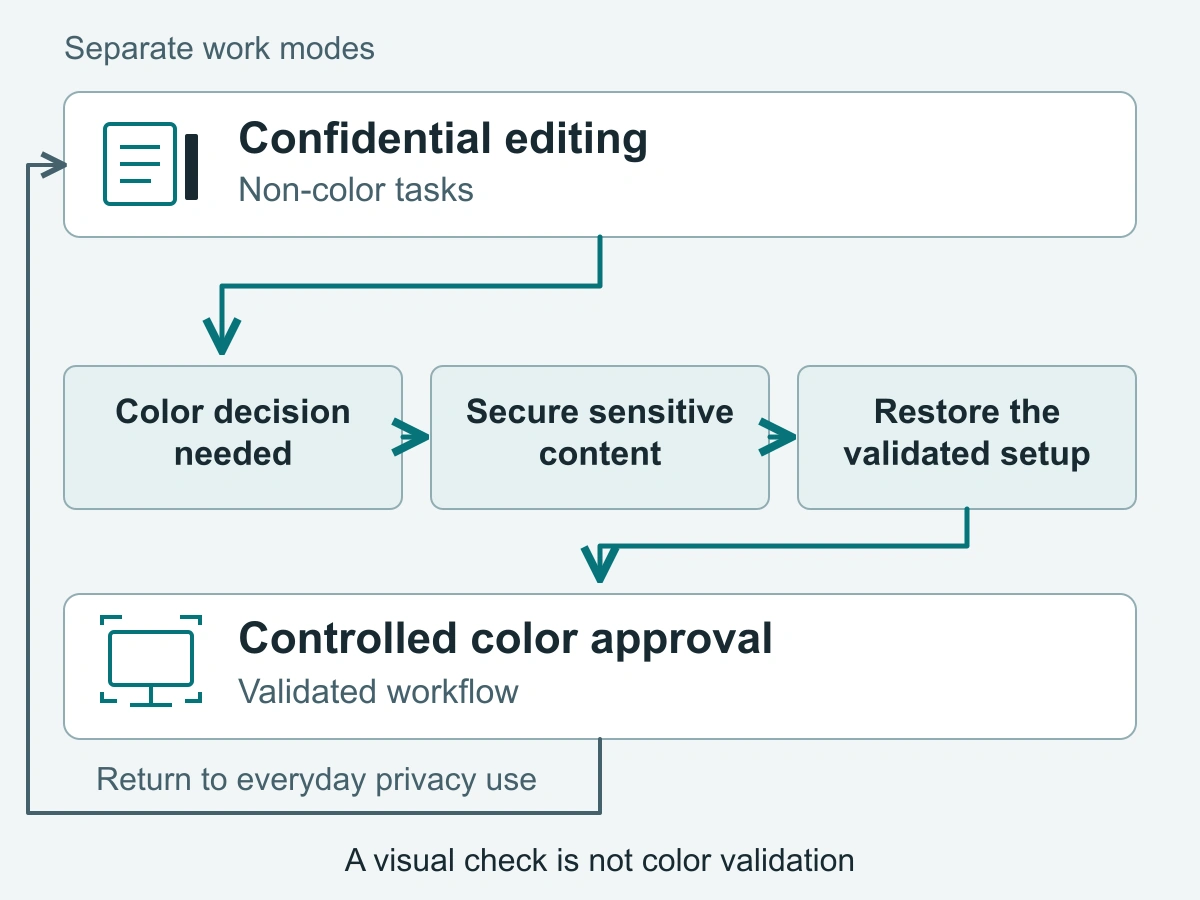
Ask one question: will the next decision depend on the color shown here? If yes, use the validated color workflow at that point. Do not postpone that switch until final sign-off if earlier retouching or design choices already rely on color.
For example, a print buyer can organize private comments and check wording during a document review, then move to the established proofing setup before judging the appearance of the proposed print. This separates useful administrative work from a different kind of decision.
Do not treat a marketing image as color evidence
A product photograph can show a workspace or a removable accessory. It cannot establish color accuracy for your monitor, filter and environment. An attractive display in a photograph is not a measured comparison, and looking at two pictures on another screen does not resolve that gap.
Use images to understand the proposed handling arrangement. For the general viewing principle, see how a privacy screen filter works. For color approval, keep the reference tied to the actual display workflow rather than a marketing scene.
Keep a known display workflow as the reference
Use the organization’s established display profile and environment
Start with the setup the team already uses for color decisions: the identified display, its established profile and settings, the application workflow, and the controlled viewing environment. EIZO’s color-management guidance describes calibration in relation to the work and environment, using measurements rather than appearance alone. That principle supports keeping a known reference; it does not validate a particular privacy filter.
Make the reference easy to recover. Keep the team’s setup instructions accessible, and identify who maintains them. If everyday use involves a different display mode or workspace, note how to return to the approved arrangement before opening a color-review task.
Removing a filter alone does not establish that the display is calibrated or that the complete workflow is restored. Return to the known setup and carry out the checks required by the person responsible for color management. If no validated workflow exists, establish one before using the display for color approval.
Do not invent a universal brightness or color-error threshold
Turning up brightness is not calibration. Making a document easier to read does not demonstrate that a filtered display reproduces color correctly, and an adjustment should not be described as compensation for an unmeasured color effect.
Keep ordinary readability choices separate from the settings used for color work. If someone changes the display during everyday use, restore the established configuration before making color decisions. Use the organization’s existing criteria and measurement process rather than adopting a generic setting from an accessory article.
Choose how privacy fits around that workflow
Removable use for tasks where the reviewed setup permits it
If the same desk serves both modes, consider how the filter will be removed, stored and returned according to its instructions. ScreenWord’s monitor privacy screens provide several attachment paths. The monitor magnetic privacy screen is a removable route to consider for a matching device configuration; removability is a handling feature, not a color-accuracy claim.
Choose a practical resting place for the removed filter and keep it associated with the right workstation. Do not force a fixed attachment to behave like a regularly removable one. Where switching accessories would disrupt the task, a separate controlled review station may be more practical.
Use this table to decide when to switch modes. It is a work-planning aid, not a record of measured product performance.
| Task | Working environment | Filter use | When to return to the validated color workflow |
|---|---|---|---|
| Read confidential briefs, edit wording or organize comments | Normal workstation with appropriate access and viewing controls | Use the selected filter where text remains usable and the attachment suits the routine | Before a decision depends on the appearance of a color or image |
| Check page order, spacing or non-color layout details | Everyday editing desk | Keep the filter in use for those structural tasks; separate color-dependent changes | When choosing colors, judging image treatment or reviewing a color-dependent layout detail |
| Retouch a photograph or select a brand color | Established controlled review environment | Use only the configuration covered by the validated workflow; do not assume the everyday filtered setup qualifies | Before making the color adjustment, not merely before final sign-off |
| Approve a screen proof or make a final color judgment | Organization’s validated color-review station and environment | If the filtered setup lacks relevant instrumented support, use the established reference configuration | Before approval, after restoring the complete reference setup and required checks |
| Resume color work after moving desks or changing the filter or display setup | Changed or unfamiliar environment | Pause color-dependent decisions while restoring or reviewing the setup | Once the responsible team member has confirmed the applicable validated workflow |
Separate sensitive work from final color judgments when evidence is absent
Plan a short handover between modes. Save the work, secure sensitive content, and move to an authorized private review space if removing the filter would expose it. Restore the established display and application setup, then carry out the team’s normal checks before judging color.
When finished, close or secure the sensitive material before returning to everyday work and reinstall the filter only as instructed. A private room or controlled review station can preserve confidentiality without treating an unverified filtered view as a color reference.
For an unusual workstation arrangement, a custom privacy filter project review can address the proposed use and attachment request. Keep that configuration discussion separate from the organization’s decision about its color workflow.
Define what would justify using a filter during color approval
Relevant instrumented evidence and a named configuration
If the team wants the filter to remain installed during color approval, the useful next step is a configuration-specific discussion with the person responsible for color management. Relevant evidence would identify the monitor, filter version and attachment, display and application configuration, viewing environment, and the instrumented measurement method and results.
Those details allow the team to judge whether the evidence applies to its work. A report about another setup, or a measurement without an identifiable configuration and method, does not establish the proposed workflow. Supplier information is an input to that review, not automatic approval.
Without relevant instrumented evidence for the named monitor, configuration, environment and method, final color approval returns to the organization’s validated color workflow. Keep the everyday privacy arrangement separate until the team has a supported basis for changing that reference.
A visual check alone cannot establish color accuracy
A user trial can answer practical questions: can the editor read comments, switch modes comfortably and store the filter conveniently? Record those observations for the accessory decision. Neither a favorable visual impression nor an ordinary marketing image establishes color accuracy.
Request a configuration review with the actual monitor and tasks, the proposed everyday-use and color-review arrangement, required quantity, and the question that remains unresolved. Paste that summary into the form. If supporting files are needed, use the site’s provided communication channels according to their instructions.