
Industrial integration
Custom-Cut Privacy Filter Drawings: Separate Critical and Reference Dimensions

Separate critical and reference dimensions in a custom filter drawing. Resolve version conflicts before approving a manufacturing reference.
A custom-cut privacy filter drawing should make three things distinguishable: the buyer’s measurement inputs, the geometry proposed for the finished filter, and the dimensions ultimately approved for production. A display opening or enclosure edge can explain the design context, but it is not automatically the finished part boundary.
The drawing should also show which dimensions control an interface, which are references, and which remain open. This article uses an original non-production cutout example with obvious placeholders. It supplies no default size, tolerance or manufacturing approval. Those decisions belong to the actual engineering agreement and its controlled revision.
Draw the finished filter boundary
Separate the finished part outline from the display and enclosure references
Give the proposed finished filter its own clearly identified outline. Show the display opening, bezel, enclosure or mounting area as reference geometry with a different line style or label. A reviewer should be able to answer, without inference, whether a callout belongs to the part being purchased or to the equipment around it.
This separation matters near cutouts, supports and covered edges. A dimension copied from the display drawing may be an input to the design, while the final filter boundary remains a separate engineering decision. Use the custom privacy filter project review for a configuration-specific discussion rather than treating an editorial diagram as a production file.
State units and orientation without repeating measurement lessons
State one unit system and identify the intended installed orientation. Label the viewing face, top edge or another agreed orientation reference when it affects how the part is understood. Do not assume that a reader will interpret width and height the same way after a drawing is rotated.
The measurement process itself belongs in the existing project records. Here, reuse the buyer’s measurement or drawing reference and focus on how those inputs are translated into the proposed finished part. For an industrial touch configuration, the industrial touch-screen custom privacy filter route provides the relevant product context, but it does not supply missing drawing values.
Dimension from a consistent reference
Use one datum for a cutout location rather than a chain of ambiguous offsets
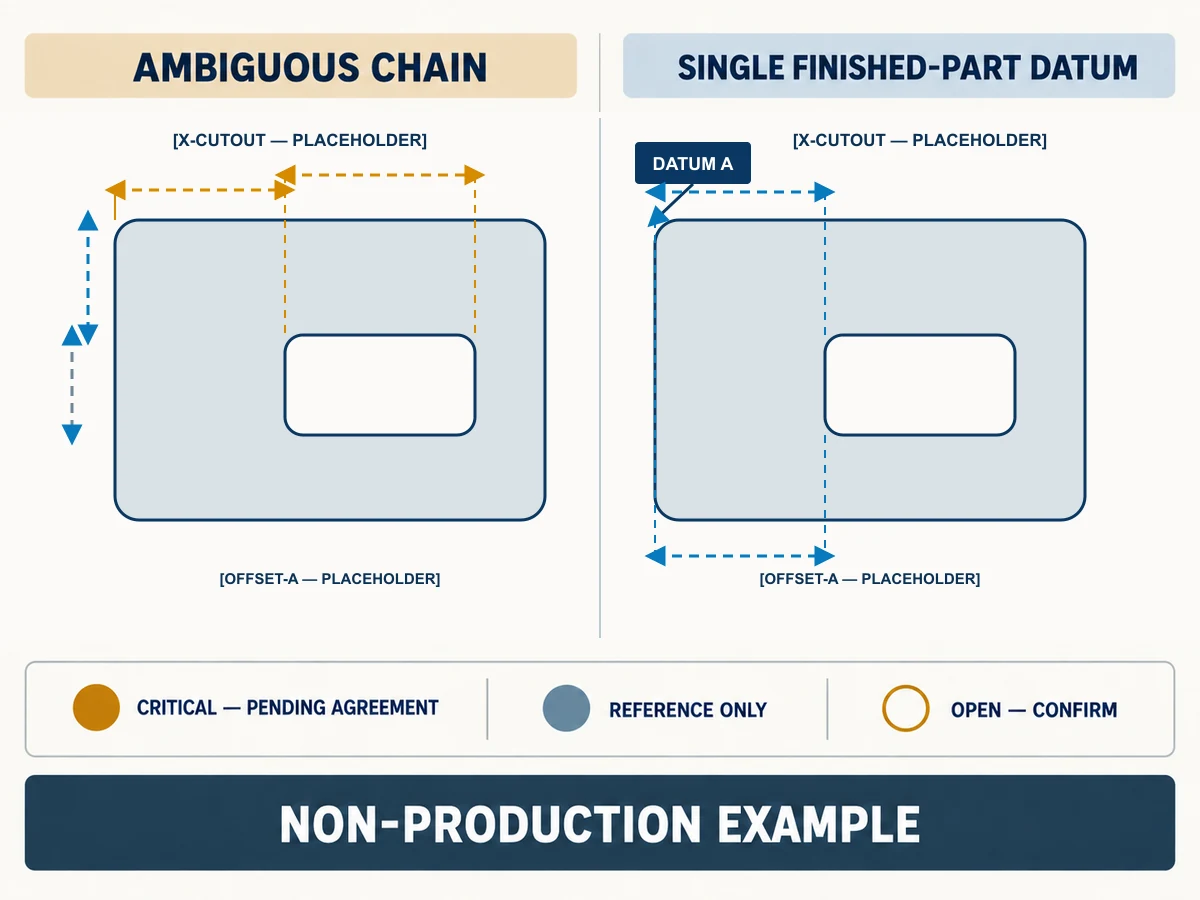
A chain of offsets can leave the cutout location dependent on several reference features. If one upstream feature changes, reviewers may not know whether the cutout is meant to move with it or remain fixed to the finished filter. A single datum scheme makes the intended relationship easier to review.
The following comparison describes the same hypothetical cutout. Every value is an explicit placeholder, and neither side is a production drawing.
| Review item | Ambiguous chained description | Single-datum description |
|---|---|---|
| Starting reference | Enclosure edge [REFERENCE ONLY] |
Finished filter left edge = DATUM A |
| Horizontal cutout location | Enclosure to opening [OFFSET-A — PLACEHOLDER], then opening to cutout [OFFSET-B — PLACEHOLDER] |
Datum A to cutout reference [X-CUTOUT — PLACEHOLDER] |
| Vertical cutout location | Top opening to cutout [OFFSET-C — PLACEHOLDER] with no finished-part baseline |
Finished filter top edge = DATUM B; Datum B to cutout reference [Y-CUTOUT — PLACEHOLDER] |
| Cutout size | [CUTOUT-W — PLACEHOLDER] × [CUTOUT-H — PLACEHOLDER] |
[CUTOUT-W — PLACEHOLDER] × [CUTOUT-H — PLACEHOLDER] |
| Review status | Baseline relationship unclear | Datum relationship proposed; engineering approval still required |
This comparison does not say that every project must use the same datum location. It shows why a reviewer needs one defined relationship for the finished part instead of reconstructing the cutout from several unrelated references.
Mark radii and cutouts where they actually affect fit
Call out a radius, notch or opening when it changes an interface, clearance or orientation decision. Keep a reference feature visible when it helps explain the device, but do not dimension every visible enclosure detail as though it controls the filter.
Use placeholder labels such as [RADIUS — PLACEHOLDER], [CUTOUT-W — PLACEHOLDER] and [EDGE-CLEARANCE — OPEN] in an early review diagram. Replace them only through the controlled engineering process. No value in this article should be copied into a quote or manufacturing file.
Show which dimensions control assembly
Mark critical interfaces and reference-only dimensions differently
A critical interface is a feature the project team has identified as controlling fit or assembly for the proposed configuration. A reference-only dimension helps explain the surrounding equipment but does not define the purchased part by itself. An open dimension has not yet been resolved.
Use distinct labels such as CRITICAL — PENDING AGREEMENT, REFERENCE ONLY and OPEN — CONFIRM during review. The classification itself must be confirmed by the responsible parties; an SEO article cannot decide which feature is critical for a real device. Link the eventual inspection or sample evidence to the exact revision through the specification and quality review, without claiming that a generic checklist approves the geometry.
Leave tolerances to the actual engineering agreement
Do not fill a drawing gap with an industry-typical tolerance. The appropriate value depends on the material, process, mating features, assembly need and agreed inspection method. The buyer and supplier should confirm which dimensions receive limits, who owns each decision, and which revision records the agreement.
Until that agreement exists, mark the field as unresolved rather than supplying a convenient number. A dimension can be labeled critical while its permissible variation remains open; that status should block final production approval, not invite an editorial default.
Resolve one worked drawing conflict
Explain a mismatched cutout reference with an original non-production diagram
Consider an unapproved buyer sketch labeled [DRAFT-REV — PLACEHOLDER]. It chains the cutout from an enclosure opening. A review markup labeled [MARKUP-REV — PLACEHOLDER] instead locates the same cutout from the proposed finished filter edge, Datum A. Both use the label [X-CUTOUT — PLACEHOLDER], but they do not share the same starting reference.
The reviewer should not average the two descriptions or silently choose one. Mark the conflict, identify which equipment and part references each drawing used, and return the issue for a single agreed definition. The communication path is:
- Unapproved drawing: retain the buyer’s source and label its status clearly.
- Review annotation: mark the differing datum, affected callout and open decision without inserting a guessed value.
- Version-conflict resolution: compare the proposed part with the controlled device/enclosure reference and record the agreed responsibility.
- Frozen reference: issue
[FROZEN-REV — PLACEHOLDER]only after the responsible parties approve the geometry; associate any physical sample as[SAMPLE-REF — PLACEHOLDER].
This is the article’s worked example, not a fabrication instruction. It demonstrates how the same cutout can be misread when its baseline changes.
Keep the revision and sample link as the final safeguard
The frozen drawing reference, approval record and sample reference should point to one another. If a later markup changes a critical interface, it should create a new controlled revision rather than overwrite the frozen basis. A sample supports only the configuration and revision it actually represents.
The custom privacy filter buyer brief covers the broader industrial RFQ inputs—application, geometry, display stack, attachment, quantity and approval path. Reuse that package rather than duplicating every field here. This article adds the narrower drawing-review path from unapproved input to annotated conflict resolution and a frozen reference.
Request a configuration review with the actual device and use, proposed configuration or drawing revision, quantity, and the dimension or version conflict still to resolve. Paste a concise summary into the form. Share drawings and supporting files separately through the site’s provided WhatsApp, Telegram or WeChat channels, following their instructions.