
Industrial integration
Validate a Touchscreen Privacy Filter on the Actual Display Stack

Define the display stack, baseline tasks and revalidation triggers for an industrial touchscreen privacy filter. Avoid blanket compatibility claims.
A touchscreen privacy filter should be evaluated as one part of a named display stack, not as an accessory with a universal compatibility result. The result belongs to the display, touch controller, cover or overlay, filter version, physical installation, firmware and settings that were actually reviewed.
The useful question is therefore not simply, “Does touch work?” It is whether the required operator tasks can be completed at the required screen locations before and after the filter is installed, under recorded and repeatable conditions. The record should also show who owns the decision and which changes will trigger another review.
Freeze the configuration under review
Display, controller, cover, filter and firmware references
Assign a stack ID before testing. Record the display or equipment reference and revision, the touch technology when it is known, the controller hardware reference, the firmware or driver reference, and the configuration or settings record used for the review. Then identify the cover lens or overlay, the filter material and version, its position in the stack, the attachment or retention method, and the relevant enclosure state.
Do not replace the actual layer order with a generic diagram. Some systems integrate layers differently. Use the buyer’s drawing, controlled configuration record or marked photograph to show where the filter sits and whether an air gap, cover, frame, clip, adhesive or another physical element is present. Mark an unavailable input as [OPEN — CONFIRM] rather than inferring it from a product family.
Keep two change lists from the start. The physical installation record covers the filter, cover, attachment, layer order, alignment, edge condition and enclosure. The electrical configuration record covers the controller, cable or interface reference, firmware or driver, calibration state and settings. This separation prevents a physical adjustment from being confused with a controller change.
The industrial touch screen custom privacy filter page gives product-route context, but it does not establish compatibility for an unnamed stack. The validation record must carry the project-specific evidence.
Identify who owns validation
Name the responsible parties and their decisions before a sample is treated as approved. A system owner may define required tasks and the acceptance state. An authorized controller or device specialist may control firmware, settings and calibration. An installation owner may control physical placement and retention. Procurement can confirm that the result is tied to the quoted configuration rather than to a generic product description.
Record who runs the baseline, who installs the filter, who may change an electrical setting, who reviews an anomaly and who signs the conclusion. If one responsibility is unknown, keep the conclusion open. The custom privacy filter buyer brief covers the broader RFQ inputs; this validation record begins after those project inputs have been assembled and does not repeat the full RFQ.
Build a baseline and task map
Center and edge targets
Translate the real application into named tasks. Examples can include selecting a control, dragging an object, entering information or completing an application-specific gesture, but only tasks actually required by the interface belong in the plan. Give each task a target area and identify whether it must be exercised at the center, an edge, a corner or another application-defined location.
Run the agreed task set on the frozen stack before the filter is installed. Record observations rather than a fabricated score: Observed as expected, Deviation observed, Could not complete, Blocked or Not run are useful states when paired with a note and evidence reference. Keep the same operator role, application state, target location and agreed repeat condition for the installed review unless the record explicitly identifies a change.
Edges deserve their own targets because a center-only check cannot answer an edge-task question. That does not mean every interface needs every corner tested. The application owner defines the required locations, and the record shows exactly what was and was not covered.
Glove or stylus only when the application requires it
Add glove or stylus cases only when they are part of the intended operation. Identify the glove or stylus reference, relevant operating mode and any buyer-controlled condition needed to repeat the task. Do not use an unspecified glove, stylus or bare finger as a substitute for the required input method.
When several input methods are required, give each one a separate task row. A result for bare-finger input does not settle a stylus case, and a result for one stylus or glove does not transfer to another. The industrial display project options page can help organize the application context, while the actual validation remains bound to the named device and input configuration.
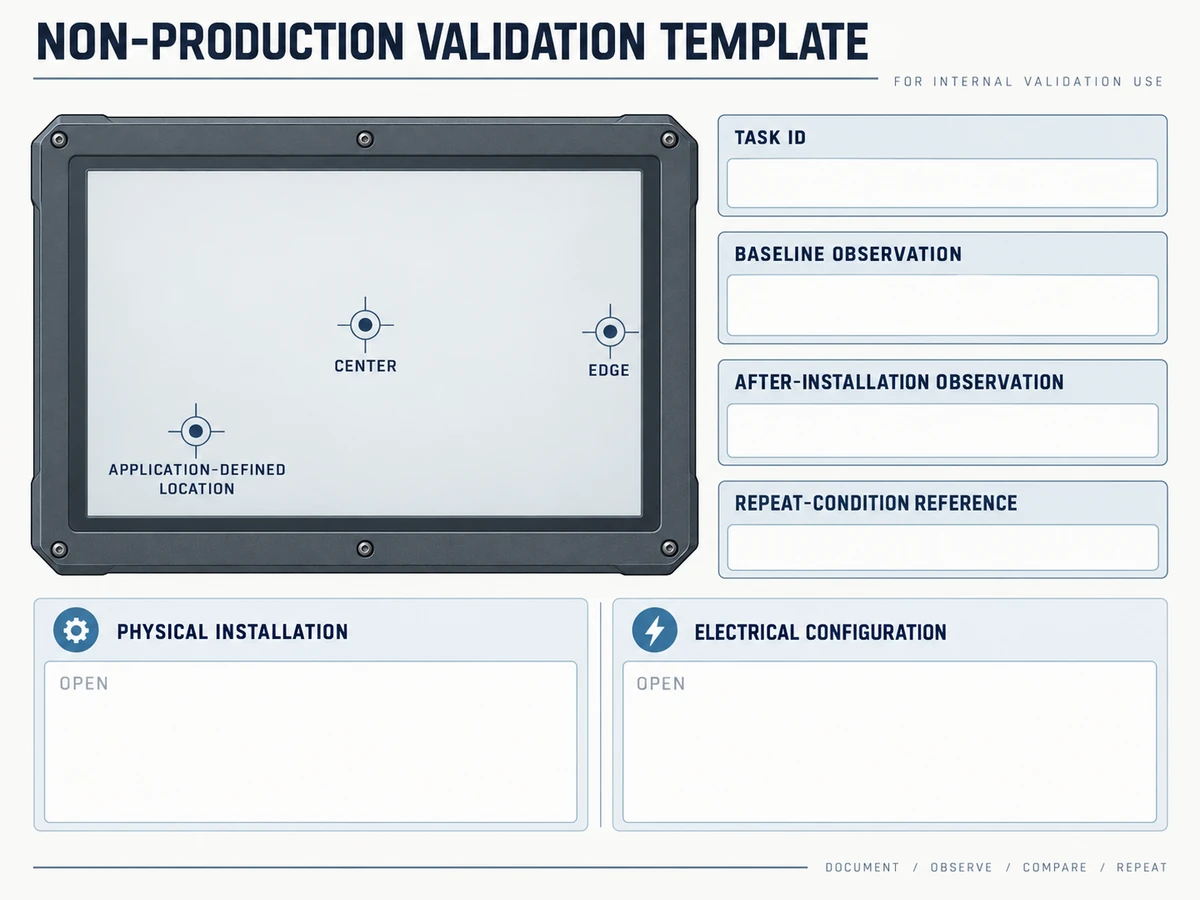
Non-production validation record
Touchscreen privacy filter validation record
Use placeholders until the actual controlled project supplies evidence. This record contains no test result, response rate, latency, tolerance, compatibility guarantee, safety approval or certification.
Record control and named stack
| Field | Controlled entry | State |
|---|---|---|
| Record / stack / configuration revision | [VALIDATION-ID / STACK-ID / CONFIG-REV] | Not started |
| Display / controller / firmware or driver | [DISPLAY / CONTROLLER / FIRMWARE REF] | Open |
| Cover / filter version / filter position | [COVER / FILTER / POSITION REF] | Open |
| Attachment / layer order / enclosure | [PHYSICAL INSTALLATION REF] | Open |
| Settings / calibration / application state | [ELECTRICAL CONFIG REF] | Open |
Responsibility and task map
| Task / decision | Location or owner | Input / repeat reference | Status |
|---|---|---|---|
[REQUIRED TASK] | Center / [DEFINED ZONE] | [INPUT / REPEAT REF] | Not run |
[REQUIRED TASK] | Edge / [DEFINED ZONE] | [INPUT / REPEAT REF] | Not run |
| Optional glove or stylus task | [APPLICATION-DEFINED ZONE] | [EXACT REQUIRED INPUT REF] | Not applicable unless required |
| Baseline / installation / anomaly / approval | [NAMED OWNERS] | [AUTHORIZATION REF] | Open |
Baseline and after-installation observations
| Task / target | Baseline | After installation | Evidence / open question |
|---|---|---|---|
[TASK-ID / ZONE] | Not run | Not run | [EVIDENCE PENDING] |
[TASK-ID / ZONE] | Not run | Not run | [OPEN QUESTION] |
Anomaly, change and revalidation
| Record | Required references | Current state |
|---|---|---|
| Anomaly reproduction | Stack, task, zone, input, application state, repeat condition and evidence | Not attempted |
| Physical change | Filter, layer, attachment or enclosure change and affected tasks | Open |
| Electrical change | Controller, firmware, driver, setting or calibration change and affected tasks | Open |
| Revalidation trigger | Changed stack, task, target, input or operating context | Owner review required |
Bounded conclusion: [STACK-ID / CONFIG-REV] remains Incomplete until the named approver records the applicable task set, conditions, open items and revalidation triggers. Any eventual conclusion applies only to that named configuration; it is not a compatibility statement for other stacks.
Record changes after installation
Task, observed behavior and repeat conditions
Install the filter using the planned physical configuration, then rerun the same mapped tasks. Place the baseline and installed observations side by side. For each row, retain the task, target location, input method, application state, operator role, repeat-condition reference and evidence reference. Describe what happened without turning the observation into an unmeasured response-rate or latency claim.
If an anomaly appears, record where it occurred and how it can be reproduced. Include the stack ID, task ID, target location, input method, application state, observed behavior, repeat-condition reference and whether the anomaly also appears in the baseline. Preserve a screenshot, photo, video or log reference only when that evidence is authorized and relevant; the record can stay Evidence pending when it is not yet available.
The custom privacy filter project review describes the broader custom path. This article adds the narrower baseline-versus-installed observation method; it does not convert a project capability into a guarantee for every display stack.
Separate electrical setup from physical attachment
When investigating an anomaly, do not change attachment and controller settings in the same undocumented step. First preserve the frozen baseline and installed records. Then let the responsible owner make one identified change, record whether it is physical or electrical, issue a new configuration revision and rerun the affected task set.
A physical change might involve the filter position, layer order, attachment or enclosure state. An electrical change might involve an authorized firmware, driver, controller setting or calibration action. These examples define record categories, not instructions to alter a device. Only the party authorized for the actual equipment should perform such work.
If several changes are unavoidable, log their sequence and do not attribute the outcome to one cause without evidence. A restored result after a combined change is still a finding for the new named stack, not proof that one element was responsible.
Define revalidation triggers
Changed material, stack or controller settings
Set revalidation triggers before the conclusion is signed. A changed filter material or version, cover or overlay, layer order, air-gap condition, attachment, enclosure, display revision, touch controller, firmware, driver, calibration state or controller setting can create a new stack. A changed required task, target location, input method or operating environment can also change the validation scope.
The owner should decide which affected rows must be rerun and record the reason. Do not silently carry forward the earlier result. Link the new observation set to the change record and retain the earlier revision so reviewers can see what changed, who authorized it and whether the conclusion remains open.
Accept the named stack only
End the record with a bounded state such as Accepted for named stack, Accepted with recorded conditions, Not accepted, Inconclusive or Incomplete. The conclusion must name the stack ID, applicable task set, configuration revision, responsible approver and unresolved items. It does not authorize a blanket statement that the filter is compatible with a product family, controller family or every installation using similar parts.
An accepted named stack should still carry its revalidation triggers. A sample result cannot be transferred to a changed production stack without review, and an incomplete task map cannot support a conclusion outside the locations and input methods actually covered.
Request a configuration review with the equipment and use, named display/controller/firmware stack, physical installation reference, quantity and unresolved validation question. Paste a concise summary into the form. Share drawings, configuration records and other supporting files separately through the site’s provided WhatsApp, Telegram or WeChat channels, following their instructions; the form does not transmit attachments.