
OEM and reseller operations
How to Write Privacy Filter Installation Instructions Customers Can Follow

Build privacy filter instructions around the actual kit, clear installation actions, visible results and useful help for first-time customers.
A useful installation leaflet helps a first-time customer identify the parts in front of them, perform one supported attachment method and recognize what should happen after every action. It does not ask that customer to interpret an internal approval record or choose among methods that are not in the package.
Write the leaflet from the actual kit outward. Confirm the product reference, the attachment method and every item the customer will see. Then turn the documented method into short steps with visible results, stop conditions and help placed where a mistake could occur. If the intended kit or method is still being selected, resolve it through a custom privacy filter project review before drafting final instructions.
Show the actual kit before the first instruction
Label the filter, confirmed attachment and removable liner if one exists
Begin with a simple kit view. Name the filter and the confirmed attachment exactly as the customer will encounter them. Use the same product reference, part names and visual cues across the package label, leaflet and support material so that the first step does not introduce a second vocabulary.
If the confirmed configuration has a removable liner, show its real location and label it as removable. If it does not have one—or the current bill of materials does not confirm one—leave it out. Apply the same rule to tabs, holders and other accessories. The leaflet is not the place to fill gaps in an unfinished kit record.
Keep the opening check practical:
- match the product reference on the kit to the leaflet;
- identify the filter and the documented attachment feature;
- identify only the preparation item or removable layer that is confirmed for this configuration;
- stop if the contents, labels or attachment shown on the leaflet do not match the physical kit.
Customers who are still choosing a format should use the guide to choosing a laptop privacy screen filter before treating an installation leaflet as applicable to their device.
Do not draw components that are not included
An illustration can look convincing even when it depicts the wrong kit. That makes an invented component more dangerous than an empty space. Do not add an adhesive strip because another model uses one, show a peel tab because it makes the drawing easier to understand, or include a storage sleeve because it appeared in a supplier image. Each visible component needs to match the approved kit record.
When an item is optional, use a version-specific panel or a clearly conditional note tied to the correct reference. Do not crowd several attachment methods into one generic sequence. A customer should never have to decide whether a drawn part is missing, optional or merely decorative.
Write one action and its visible result per step
For the approved magnetic example: orient and align using the product reference
Use one installation method from beginning to end. For the limited magnetic example supported by the current universal laptop magnetic privacy screen, the instruction can tell the reader to use the product reference to confirm orientation, align the filter with the top display edge and let the documented attachment engage.
Separate those actions if one image cannot show them clearly. After the orientation action, the visible result should be that the filter is presented in the same direction as the product reference. After the alignment action, the visible result should be that the top edge follows the documented position rather than sitting visibly reversed or displaced.
Do not turn this example into a universal compatibility statement. The device and filter reference still control whether the leaflet applies. Do not add a camera-clearance, sensor-clearance, magnetic-force or edge-contact claim unless the approved configuration documents it.
Show the approved removal and repositioning action, then separate storage
Removal needs its own action and result. Show the reader taking the filter away using the handling location documented for the actual configuration. The visible result is a filter separated from the display—not a claim about residue, durability or the number of times the action can be repeated.
If the leaflet needs a repositioning step, return to the same approved orientation and top-edge alignment action. Do not imply that repositioning has been cycle-tested. When the filter is not being used, show it stored separately in the approved location or container for that kit. If a sleeve or holder is not confirmed as included, do not draw it as a supplied accessory; describe separate storage without inventing package contents.
Do not invent adhesive preparation or force-close steps
Do not borrow preparation steps from another attachment method. A magnetic sequence should not acquire adhesive cleaning, liner removal, pressure passes or curing time simply because those actions appear in other screen-accessory instructions. Likewise, do not tell the customer to close a laptop with the filter installed unless the exact device and configuration documentation supports that action.
Keep unsupported care, fit and device actions outside the sequence. A short leaflet with one complete, documented method is safer and easier to follow than a longer leaflet assembled from several unrelated product instructions.
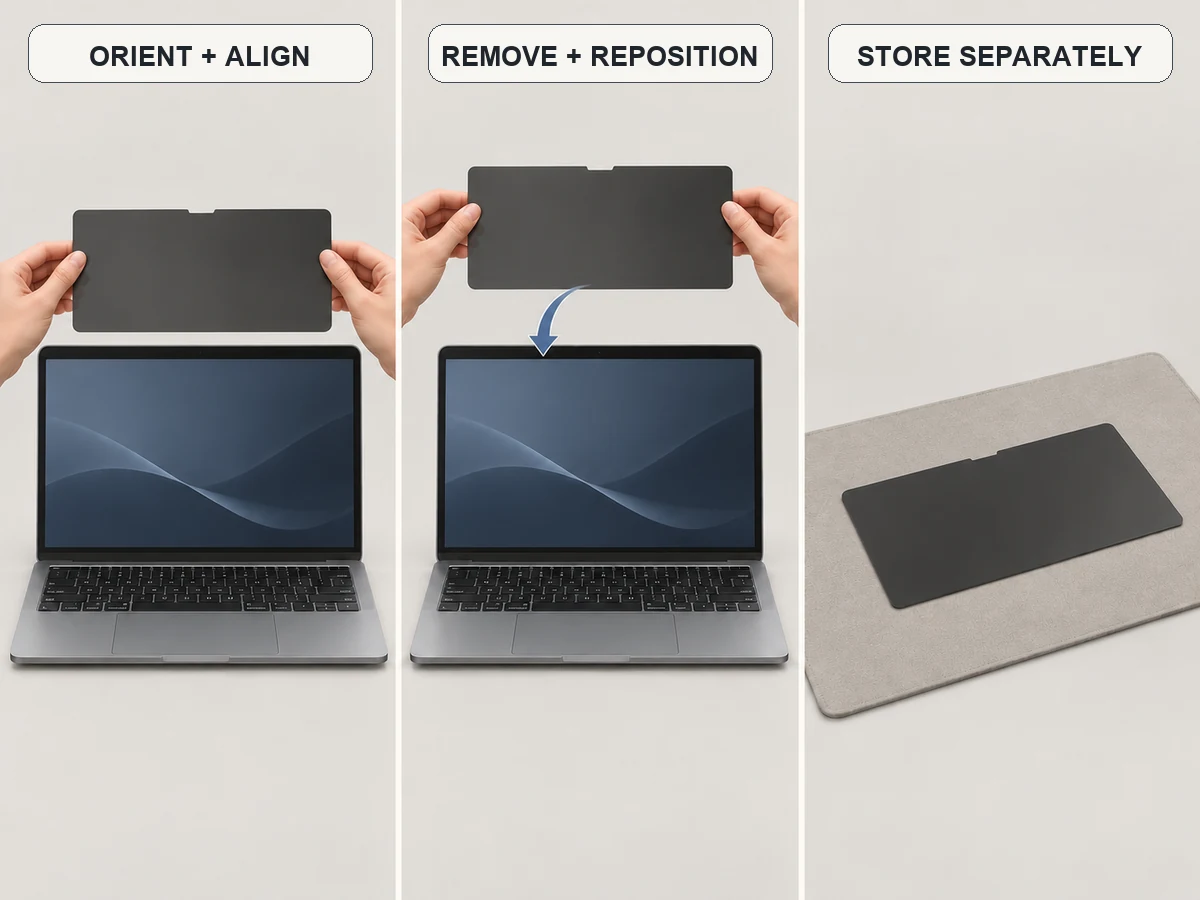
One-page instruction storyboard
| Panel | Actual part | One action | Visible result | Stop condition or help |
|---|---|---|---|---|
| 1. Match the kit | Filter, confirmed attachment and product reference | Match the physical labels to the leaflet | The reader can point to every part needed for this method | Stop if a shown part is absent or an unlisted part appears |
| 2. Confirm orientation | Filter and matching device reference | Hold the filter in the documented direction | The top edge and orientation match the reference view | Stop if the filter appears reversed or the reference is unclear |
| 3. Align | Filter top edge and display top edge | Align the filter using the product reference and let the documented attachment engage | The top edge follows the documented position | Stop if the edge contact or position is uncertain |
| 4. Remove and reposition | Filter and documented handling location | Take the filter away; if needed, repeat the same approved orientation and alignment action | The filter is separated or returned to the documented position | Use the adjacent support URL if the handling location or alignment cannot be confirmed |
| 5. Store separately | Removed filter and the approved storage location for the kit | Place the filter in the documented separate storage location | The filter is no longer against the display | Do not depict a sleeve or holder as included unless the kit record confirms it |
This is a writing skeleton, not a substitute for configuration-specific pictures. Replace every generic description with the approved part name and the real visual reference for the kit being documented.
Place the help exactly where mistakes occur
Show a reversed orientation or uncertain edge contact as a stop condition
A warning at the end of the leaflet arrives too late. Put the stop instruction beside the step where the customer can first detect the problem. For the magnetic example, show the expected orientation next to a clearly marked reversed state. At the alignment step, tell the reader to stop when the intended top-edge position or contact cannot be confirmed from the product reference.
Do not tell the reader to compensate by pressing harder, adding an attachment piece or trying a different orientation. Those actions would introduce a new method. The safe editorial response to an undocumented condition is to pause the sequence and identify the configuration question.
Put the matching support URL next to that condition
The support route should sit beside the stop condition, not only on the back page. Pair it with a specific prompt such as: “Stop if the filter orientation or top-edge position does not match this view.” Then link the reader to contact ScreenWord about the configuration and ask them to provide the device, installation method and action that is unclear.
Keep that request concise. Do not imply that the page has already confirmed compatibility, and do not instruct the reader to send an attachment through a form that does not support one. The purpose of the nearby URL is to prevent improvisation and route a bounded question to the right review.
Check the leaflet with a first-time reader
Can they find the right part and complete the documented sequence?
Give the leaflet, the actual kit and the matching device reference to someone who has not seen the draft. Ask them to point to the filter and confirmed attachment, select the correct orientation and follow the documented actions without verbal coaching. Observe where they hesitate; do not convert the session into a demonstration by the writer.
The review passes only as an editorial check of the documented sequence. It does not establish product compatibility or performance. Record whether the reader could find the correct part, locate the next action, recognize each visible result, identify the stop condition and find the matching support URL.
Correct missing actions before recording the version number
When a reader hesitates, compare the leaflet with the approved product reference. Add a missing action, improve a label or replace an ambiguous image only when the source documentation supports the correction. Do not solve confusion by inventing a liner, adhesive step, included accessory, force-close action or performance promise.
Record the leaflet version only after its text and images match the selected kit and the first-time-reader check is complete. Keep version approval at the end of the page so that internal status does not interrupt the customer’s action sequence.
Request a configuration-specific quote for a new or revised instruction leaflet. Submit the intended installation method, device and a short summary of the action that still needs clarification. Treat the response as a configuration review—not as retroactive approval of an unfinished instruction.