
Industrial integration
Can You Put a Privacy Filter over an Existing Screen Protector?

Record existing and proposed display film layers before combining privacy functions. Separate complete-assembly evidence from individual film claims.
Sometimes—but only when the documentation for the device and the exact accessories supports that complete arrangement. A statement about one privacy filter or one screen protector does not prove that two layers can be combined on another display.
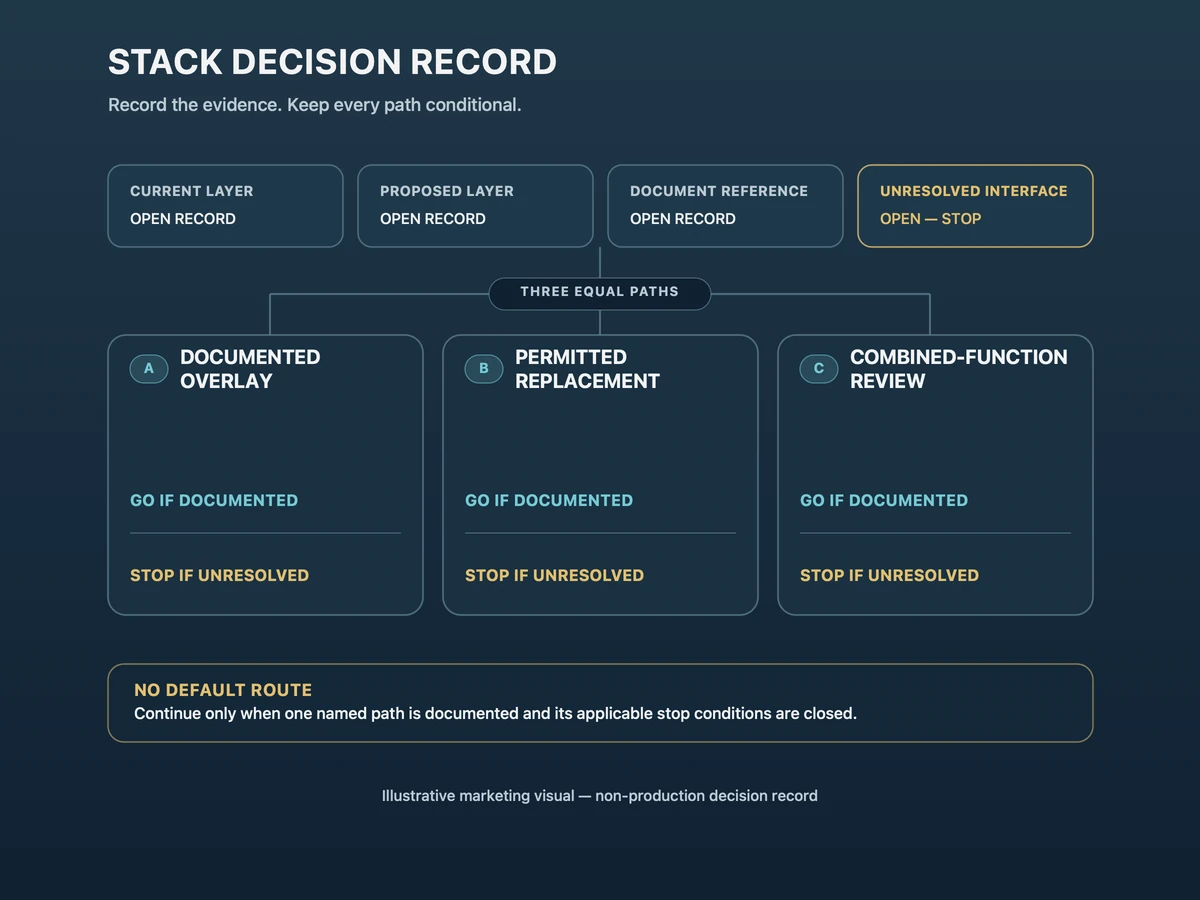
Start by identifying what is already on the display. Then choose one of three paths: retain a documented compatible overlay, replace the existing removable accessory when its instructions allow removal, or request one combined-function filter instead of building an unverified stack. If the current layer or an interface between layers remains unknown, stop the configuration decision and send the open question for review.
Identify what is already on the display
Distinguish a removable accessory from bonded cover glass or a working display layer
A removable accessory is a separately installed item with its own product reference and documented attachment or removal method. Examples may use tabs, a removable frame or another accessory-specific method, but appearance alone is not enough to identify one.
Bonded cover glass belongs to the device or display assembly rather than to an add-on protector. A working display layer performs a defined display or input function within that assembly. Neither should be relabeled as a removable screen protector simply because it is the outer surface a user can see.
Record the current item as removable accessory, bonded cover glass, working display layer or unresolved. Do not probe an edge, lift a corner or peel a layer to find out. An unidentified or functional layer stays in place until the device owner or original documentation resolves it.
Use the device or original accessory document to identify it
Use the exact device reference, service or integration document, bill of materials, drawing, purchase record, or original accessory instructions. Record the document title or number and revision when available. For a separately purchased protector, retain its exact product reference and the installation or removal instruction that applies to it.
A generic listing, visual resemblance or description for a related model is not a document reference for the installed item. When records conflict, preserve both references and mark the identity or interface UNRESOLVED — STOP. The custom privacy filter buyer brief lists the broader device, geometry, touch, attachment and drawing inputs for an industrial request; this article does not repeat that full RFQ.
Choose one of three supported paths
A documented compatible overlay
Use an overlay path only when controlled information identifies the current layer, the proposed privacy filter and the combination that is allowed. The evidence should apply to the exact product references or to a written project configuration—not merely say that one item is “touch compatible” or can be used with protectors in general.
The record should also resolve fit, attachment and any important contact interface. If the device owner requires input, readability or installation checks, keep those requirements with the named configuration. If the documents do not cover the proposed pairing, the overlay path stops.
Replacement only if original removal is allowed
Replacement means removing a documented removable accessory and installing the selected replacement through an authorized path. Proceed only when the original accessory or device instructions permit removal, the responsible owner authorizes it, and the replacement configuration has a defined fit, attachment and review route.
Stop if the existing item could be bonded cover glass, a working display layer or an accessory whose removal instructions are unavailable. Do not turn a replacement decision into do-it-yourself layer removal. The existing item remains in place until its identity and permitted service path are documented.
A combined-function filter instead of unverified stacking
When privacy plus another surface or optical function is required, ask whether one filter can be specified for the required functions and installation rather than assuming that two separate films should be stacked. This path can reduce the number of unresolved interfaces, but it is still a project request—not proof that every requested function is available together.
Use the custom privacy filter project review and the industrial touch screen custom privacy filter route to describe the proposed configuration. Keep any material, function, attachment, touch or performance point open until it is confirmed for that project.
Current/proposed layer decision tree
| Decision point | Record | Go condition | Stop condition |
|---|---|---|---|
| 1. Current layer | Exact identity and role: removable accessory, bonded cover glass, working display layer, or unresolved | The device or original-accessory document resolves the identity | Identity relies on appearance, a related model, or an undocumented assumption |
| 2. Proposed layer | Exact product, drawing or project-configuration reference and intended position | The proposed layer and its position are defined | The proposed item or its contact interface is still unknown |
| 3A. Documented overlay | Document reference for the exact current/proposed combination | The combination is explicitly supported and all required owner checks are assigned | Only an individual-product claim or generic compatibility statement is available |
| 3B. Replacement | Removal permission plus replacement reference | The existing item is documented as removable, removal is allowed, and the replacement route is defined | The item may be bonded or functional, removal is not authorized, or replacement evidence is incomplete |
| 3C. Combined-function filter | Written list of required functions, geometry, attachment and review questions | One proposed configuration can be reviewed against the recorded requirements | Availability or performance is being assumed before project confirmation |
| 4. Unresolved interface | Contact surface, edge, adhesive, air gap, cover, touch path or enclosure question | Every interface required for the selected path is resolved or assigned to a named review | Any interface that can affect fit, use or service remains unowned or unresolved |
The tree does not select a product or declare compatibility. It identifies whether the evidence is sufficient to continue with one path. If none of the three path conditions is met, keep the current assembly unchanged and send the record for review.
Check the installed combination in use
Contact points, edge clearance, readability and input tasks
After one path is documented and installed through its approved method, inspect the complete arrangement in the intended device context. Record whether the proposed layer contacts another surface, interferes with an edge, bezel, enclosure, camera or sensor area, or changes the clearance needed for the intended attachment. Use observations tied to the named assembly rather than an assumed thickness.
Check readability from the operator’s required position and complete only the input tasks that the application actually requires. For a touch, pen, stylus or glove workflow, name the input and task instead of treating one generic tap as universal evidence. Detailed baseline and task validation begins only after the layer path is defined; this configuration decision supplies that later review with the current and proposed stack recorded.
One product report does not validate the complete combination
A material sheet, accessory instruction or test report can support a claim about the item and configuration it names. It does not automatically cover another protector, the interface between two layers, the device enclosure, the input method or the complete installed assembly.
Keep individual evidence attached to the individual item. Record assembly observations against the complete named combination. The specification and quality review can organize which configuration details need written confirmation, but it does not replace project-specific evidence or make an open combination compatible.
Send an unresolved combination for review
Provide both accessory references and the device information
Send the device or display reference, the identity and document reference for the current layer, the product or drawing reference for the proposed layer, and a simple current-versus-proposed order. Add the intended application, attachment, quantity and the exact interface question that remains unresolved.
If available, include a marked drawing or photo reference, but keep confidential or controlled files within the buyer’s approved sharing process. State which of the three paths is being considered and which go condition is missing. That lets the reviewer answer a bounded configuration question rather than guess what “over a protector” means.
No assumed layer thickness or universal touch support
Do not fill a missing thickness, response rate, touch result or compatibility statement with a typical value. Do not infer that a proposed layer supports every touch technology, controller, stylus or glove because one product report uses broad compatibility language. Leave the field OPEN — CONFIRM and name the evidence needed to close it.
Request a configuration-specific quote with the device and use, current-layer reference, proposed configuration or drawing reference, quantity and unresolved interface question. Paste a concise summary into the form. Share drawings, accessory instructions and other supporting files separately through the site’s provided WhatsApp, Telegram or WeChat channels, following their instructions; the form does not transmit attachments.